1
Getting Connected
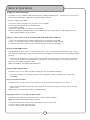
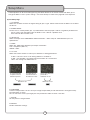
Audio Connections
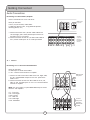
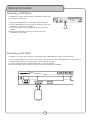
Connecting to a Stereo Mixer/Amplifier
Use this connection for music and vocals.
�������������
����������
What you will need:
• RCA L/R (red & white) audio cables
• Audio input device (mixer, amp, powered speakers,
recording device, etc.)
1. Connect one end of the L/R RCA audio cable to the
Left and Right (red & white) RCA Output channels on
the DVG-777K III’s rear panel
2. Connect the other end of the L/R RCA audio cable to
the L/R RCA audio inputs on an audio input device
REC OUT
AV OUT
RECORD
AUDIO
AV INPUT
AV3
AV2
���������
����������
��������
����������
������
STEREO INPUT
AV1
PHONO 3
CD 3
PHONO 2
LINE
CD 2
PHONO 1
LINE
CD 1
PHONO
remote
5.1 Audio
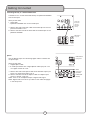
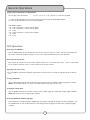
Connecting to a 5.1 Surround Sound Receiver
What you will need:
• 6 RCA-style surround sound cables
• A 5.1 surround sound receiver or amplifier
�������������
����������
1. Connect an end of each RCA cable to the Left, Right, CEN,
SL, SR, and Subwoofer outputs on the rear panel of the
DVG-777K III
2. Connect the other end of each RCA cable to the FL, FR,
CEN, SL, SR, and SW inputs on a 5.1 CH. Surround Sound
receiver or amplifier.
FL - Front Left
FR - Front Right
CEN - Center
SL - Side Left
SR - Side Right
SW - Subwoofer
�����
�����������
•
•
•
•
•
•
�����
NOTE: The actual inputs may be labeled differently on certain
receivers and amplifiers.
�����
�����
8
�����
�����
�����
�����
�����
������
��������
����������
��������
���������
������