1
Software Installation
Nucoda and Phoenix 2014 Install Manual
Environment Variables
A number of environment variables are setup as part of the installation process. These
configure the location of the preference file, panel IP addresses etc.
note
For Phoenix installs, replace the string Nucoda with Phoenix (uppercase for the
environment variables).
Environment Variable
Description
NUCODA_LICENSE_DIR Set to the folder containing the product
license file e.g.
C:\Nucoda\License
NUCODA_ROOT_V2014_1 Set to the "root" folder i.e. the folder
containing the main preference file
general.prefs e.g.
C:\Nucoda\2014_1\root
NUCODA_VALHALLPANEL The IP address by the Valhall panel e.g.
192.168.64.2
NUCODA_PRECISIONPANEL The IP addresses used by the three
Precision panels (comma separated) e.g.
192.168.21.1,2,3
NUCODA_PRECISIONCOLOUR The IP address used by the Precision
Colour panel (for Nucoda Fuse use) e.g.
192.168.21.1
NUCODA_KEYBOARD Set to the selected keyboard type e.g.
US
note
The installation process will never touch your application configuration, projects or
preferences. It will only install or update program executables and libraries. The
installer can be safely re-run any time.
Install Options
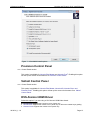
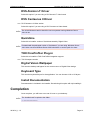
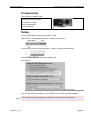
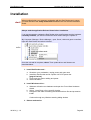
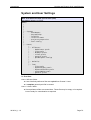
The installation options are presented in a scrollable list.
Tick the checkbox to the left of the option name to schedule it for installation. Available
options will vary across products (7 below shows every possible option and may differ to
those you see).
IM-2014_1-1.0
Page 12