1
USING YOUR THERMOSTAT
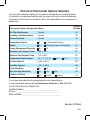
System Setting
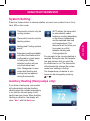
Thermostat controls only the
cooling system.
Thermostat controls only the
heating system.
Heating and Cooling systems
are off.
Emergency setting available
only when the thermostat is
configured for a heat pump
in the system. When
selected, system will use
only the backup heat.
Auto Changeover is used
where both heating and
cooling may be required
during the same day.
AUTO allows the thermostat
to automatically select
heating or cooling depending
on the indoor temperature
and the selected heat and
cool temperatures. This
thermostat will not allow you
to program a conflict
between Heating and
Cooling setpoints.
For example: In the morning heating is
required. During the day, the temperature gets warmer and you want the
air conditioner to run. The thermostat
will automatically change the system
mode from heating to cooling.
The temperature you desire in your
home can be changed by pressing
or .
Auxiliary Heating (Heat pumps only)
If you have a heat pump, your system
will automatically activate Auxiliary
Heating when the outside temperature
is too cold for the heat pump to efficiently heat your home. When Auxiliary
Heating is called for, the display will
show “Aux” with the Heat icon.
7
USAGE GUIDE
Press the System button to choose whether you want your system to be in Cool,
Heat, EM or Auto mode.