1
TemporaryTemperatureHold
USAGE GUIDE
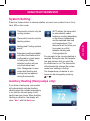
You can temporarily adjust the temperature in your home at any time while
your thermostat is running a program
by pressing either the
or . Your
thermostat will maintain this desired
temperature for four hours (default).
The display will show “Holdat” by
the desired temperature, and “Hold
Until”with the time the temporary hold
will end. The display will also briefly
show “press or tosettheHold
Time”. While this message is displayed, you can change the time that
you wish to have the Hold end.
Press the button to cancel a temporary hold. The desired temperature will
display the current program setting.
permanent temperature Hold
If you desire, you can set your
thermostat to permanently hold a
temperature. This feature will bypass
any programs you may have set
in your thermostat and maintain a
constant temperature.
To enter permanent hold, change the
temperature with the
or
and
press the Hold button. When your
thermostat is in this mode, the “Hold
at” will be displayed by the desired
temperature.
Press the button to exit and resume
programmable mode.
8