1
Input Power Installation (continued)
Procedure
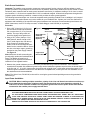
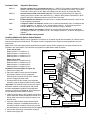
1. Place the controller’s main power switch
in the Off position. See Figure 3.
2. Position the input voltage select switch to
the 115V (for 115-120V service) or 230V
(for 230-240V service) as required.
3. Remove the power wiring access cover
located on the back of the power supply
assembly. See Figure 4.
Note: The power and equipment ground
wires are connected to a terminal block
located on the back of the power supply
assembly. The power wire access hole provided will accommodate a 3/4" (19mm) conduit fitting. If conduit is required by code,
install a section of flexible 3/4" (19mm) electrical conduit from the foundation conduit to
this access hole.
4. Route the appropriate size 3-conductor
cable (10 AWG [2.5mm2] maximum) from
the power source location to the power
supply terminal block.
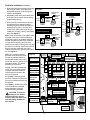
5. Reference Table 1 for the appropriate
type of power connection. Secure the
wires to the terminal block as indicated in
Figure 4.
6. Reinstall the power wiring access cover.
7. Apply power to the controller.
Figure 3
WARNING
HIGH
VOLTAGE
3.2A Fuse –
Station Output
On
Off
Main Power Switch/
1.5A Circuit Breaker
115V
4.0A Circuit Breaker –
Control Functions
Input Voltage
Select Switch
Table 1
Line
AC Service Type
115/120 V a.c. 50/60 Hz (Dom.)
Equip. Grnd.
Hot (Black)
230/240 V a.c. 50/60 Hz (3-Phase) Hot (Black)
230/240 V a.c. 50/60 Hz (Int)
Neutral
Green
Neutral (White)
Green/Yellow
Hot (Blue or Red)
Hot (Brown) Green/Yellow
Neutral (Blue)
Equipment Ground
Figure 4
Neutral
Line
Note: The satellite incorporates a 24 V a.c.
Hot Post feature on each station output
module which enables control valves to be
identified through momentary activation. To
utilize the Hot Post feature, the satellite
power supply must be switched on.
If you do not wish to use the Hot Post feature,
leave the controller’s main power switch Off
until the installation has been completed. See
page 4, Figure 6.
Cover (Side View)
3/4" (19mm) Conduit
(Optional)
Field Wire Installation
CAUTION: The E-Series OSMAC satellite is capable of operating up to 12 stations simultaneously when
operating with pump, or 16 stations simultaneously without a pump. To prevent possible controller
damage, total output current load must not exceed 3.2 amps. If more than one valve per station will be
connected, calculate the total in-rush current load which would be imposed in the maximum operating
conditions and use this value as a guide during installation and operation of the controller.
Procedure
1. Attach the control and common wires to each valve and/or valve-in-head solenoid leads using an approved waterproof splicing method. Route the wires into the controller cabinet through the 3" (76mm) conduit.
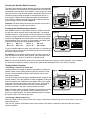
2. If automatic pump start is required, refer to the applicable wiring diagram in Figure 5 (page 4) and install accordingly.
Caution: Do not connect the pump starter directly to the controller’s pump start circuit – damage to
the controller will result.
Note: The pump circuit can also be utilized to control a master valve if required.
3