1
Chapter
2
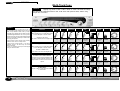
DC2496 BASIC EFFECTS
BASIC EFFECTS
CHAPTER 2
Input Signal
Limiter
Word Resolution
Dither
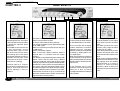
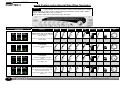
INPUT SIGNAL shows the
selected input source. This signal
is also indicated on the rear panel
by lighting the selected signal
Green LED.
The WORD CLOCK must be set
to the appropriate source
otherwise clicks, pops or even
loud white noise may be heard.
When setting up for a new signal
source firstly select the mode for
RECORD or PLAY (each mode
has its own set of input, Limiter,
Word Res etc. settings)
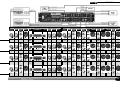
The limiter will only have any effect when ‘DIGITAL
GAIN’ is set greater than 0dB.
There are several attack/decay settings:
use ‘SLOW’ for least intrusive signal leveling with
up to 18dB of gain,
‘MED’ to increase to perceived volume with up to
+12dB of gain,
‘FAST’ for transient capture.
Note: if more than +9dB of ‘DIGITAL GAIN’ is
applied then it is possible hear the limiter
pumping,
use ‘HOLD’ to normalise the signal to exactly 0dB.
Select ‘HOLD’, play the track using +18dB of
‘DIGITAL GAIN’ then rewind and the track will be
ready to play with its max peaks unlimited at 0dB.
Re-select the ‘HOLD’ LED to re-set the hold level.
The ‘LIMIT’ meter LED will remain lit when ‘HOLD’
is selected and the input signal has been limited,
until the ‘LIMITER’ button is pressed. The ‘LIMIT’
LED will also remain lit for up to 10 seconds as
the limiter releases when ‘SLOW’ and the input
signal has been severly limited.
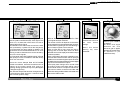
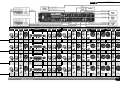
WORD RESOLUTION defines the
number of bits per audio sample,
ie: Standard audio CD is 16bits.
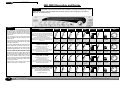
H.F dither generally removes the
low level distortion on low signal
levels with the least noticable
noise.
M.F dither produces the lower
distortion with a slight increase
in noise over H.F dither
DUAL dither produces the lowest
distortion but still has much less
perceived noise than White noise
dither.
White noise is the standard dither
added to prevent distortion on low
level signals when the WORD
RESOLUTION of a signal is
reduced, ie. 24bit recording
reduced to 16bits. It offers poor
performance in terms of perceived
noise.
ALWAYS reduce to monitor
volume before changing the input
signal or word clock source to
prevent damage to ears or
speakers.
8
This must match the recording
medium otherwise ‘Truncation’
distortion will occur. Truncation
distortion cannot be removed after
recording by adding dither to a
truncated signal.
When word resolution is reduced
to less bits than the original then
dither must be added to mask the
distortion that is caused when the
bits are lost.
If the DC2496 A/D is 24bit
resolution, when reducing this to
16bits for a DAT recording
normally best results are obtained
with HF dither.