1
Daily use
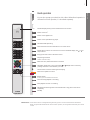
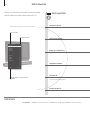
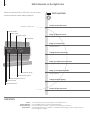
6 How to use your remote control
8 Introduction
10
Watch television
12 Watch television via the digital tuner
14
Use the Blu-ray player
16
Change sound type and picture format
17
Use the Adaptive Sound Technology
Installation
20
Set up your television
21
Cleaning
22
Connection panels – BeoVision 7–55
24
Connection panels – BeoVision 7–40
26
First-time setup of your television
Cautions
– Ensure that the television is positioned, set up
and connected in accordance with the
instructions in this Getting Started. To prevent
injury, use Bang & Olufsen approved stands and
wall brackets only!
– Place your television on a firm, stable surface.
– Do not place any items on top of your television.
– Do not subject the television to rain, high
humidity or sources of heat.
– The television is developed for indoor use in dry,
domestic environments only. Use within a
temperature range of 50–105°F (10–40°C), and
at an altitude of no more than 5,000 ft
(1,500 m).
– Do not place the television in direct sunlight or
direct artificial light, such as a spotlight, as this
may reduce the sensitivity of the remote control
receiver. Also if the screen is overheated, black
spots may appear in the picture. These spots
disappear again, once the television cools down
to normal temperature.
– Leave enough space around the television for
adequate ventilation.
– Connect all cables before connecting or
reconnecting any of the products in your system
to the mains.
– No naked flame sources, such as lighted candles
should be placed on the apparatus.
– Do not attempt to open the television. Leave
such operations to qualified service personnel.
– Do not strike the glass with hard or pointed
items.
– The television can only be switched off
completely by disconnecting it from the wall
socket.
– The disconnect device shall remain readily
operable.
– The supplied mains cord and plug are specially
designed for the television. If you change the
plug or in any way damage the mains cord, it
can affect the TV performance.
Daily use
Contents