1
LAP
Lap Feature
LAP
START
0.00.00
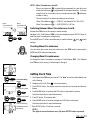
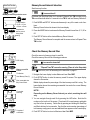
Up to 50 lap data points can be captured (Elapsed Time, Average Heart Rate for the lap, [Average Speed for the lap]
and Trip Distance) and stored in memory for manual review or downloading to a PC with an interface unit.
TM
LP-01
LP-02
LP-03
Lap interval longer than 5 sec.
Up to about 27 hrs.
Recording Lap Data
LAP
‘Beep’
Lap number display for 3 sec.
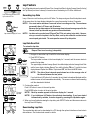
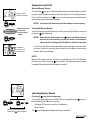
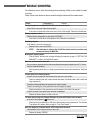
In any of the main or sub functions, push the LAP button. The beep sound goes off and the lap data is saved.
At the same time, the lower display indicates the current lap number for about 3 seconds.
NOTE !: You must wait a minimum 5 seconds before recording next lap. The maximum
measurable time is 27 hours and 46 minutes.
Because the lap data captured is the average heart rate and average speed for the
interval, short lap intervals may produce inconsistent data.
NOTE !: Lap data can be recorded even if Elapsed Time TM is not running (=stop state). However,
once you record the lap data in the Stop State, next lap data cannot be recorded unless
current speed gets started. The reset operation erases all lap data points.
Lap Data Read Out
To review the lap data:
TM
STOP
SET/AT
MODE
Switching TM/DST
LAP
NOTE !: The data of heart rate and speed shown here is the average value of
the interval between the two points.
If you hold down LAP button for 2 seconds, the unit starts to download the data and the
MODE
readout screen is fast-forwarded automatically. The screen continues fast-forwarding
until the download is finished.
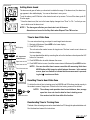
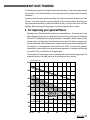
3. Continue the readout.
Push LAP button to move to the next lap data.
Push MODE button to return to the prior lap data.
The next
NOTE !: Each lap number appears in the lower display for 1 second.
lap data
NOTE !: If you hold down LAP button, the unit starts downloading. If you have started
to download by mistake, it can be stopped by pressing the Lap button again.
4. When you have finished reviewing the Lap data, push SET/AT button and the screen returns to
the Lap Count LP display.
Lap data readout screen
LAP
SET/AT
Elapsed Time is not running. (=stop state)
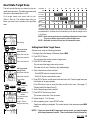
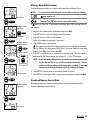
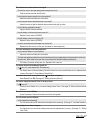
1. Navigate to where the Lap Count LP is in the lower display.
2. Push SET/AT button.
The lap number is shown in the lower display for 1 second, and the screen starts to
readout the lap data.
The upper display indicates Average Speed, the middle display indicates Average Heart Rate
and the lower display indicates Elapsed Time with the flashing TM icon. To switch the lower
display between Elapsed time TM and Trip distance DST, hold down the MODE button.
Downloading
Downloading Lap Data
The recorded lap data can be downloaded to a PC through the optional interface unit and e-train
data software. See the download manual for details.
MSC-2Dx 15