1
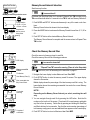
Memory Record Interval Selection
Main/Sub Function
Start from any function.
MODE + SET/AT
OFF
icon must be off.
Memory record timing selection screen
MODE
SET/AT
Hold down the Start/Stop Button for 2 seconds if Elapsed Time TM is running or turn
TM on and then hold down for 2 seconds to turn TM off and turn Memory Record off.
Timing selection
→5 sec.→15 sec.
→30 sec.→60 sec.
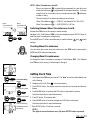
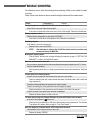
1. Push MODE and SET/AT buttons simultaneously in any of the main or sub functions.
Complete the
memory record
timing select
setting.
2. Press the MODE button to advance the Memory Record Interval from 5, 15, 30 or
60.
Memory Record Interval is shown in the lower display.
3. Push SET/AT button at the desired Memory Record Interval.
The Memory Record Interval is complete and the screen returns to Elapsed Time
TM function.
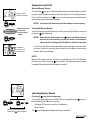
Check the Memory Record Files
Check the amount of memory stored in each file.
Check the memory files with the following procedures.
MXP display
OFF
TM
STOP
SET/AT
icon must be turned off.
"Elapsed Time TM" can not be running. (Timer is in the Stop-state)
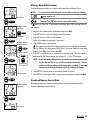
Memory record file
screen
When
File Number
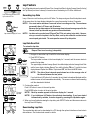
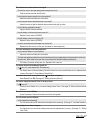
1. Navigate the lower display to show Maximum Heart Rate MXP.
Used Memory Rate (%)
2. Push SET/AT button to enter the memory record file screen. The upper display
shows the file number.
Max. measurable time
Ex.) 3h and 26min.
LAP
File number
switching
icon is on, turn it off according to the instruction in page 21.
Middle display shows the percentage of the total memory each file is using. The
lower display shows the remaining measurable time under the current Memory
Record Interval.
NOTE !:
Depending on the Memory Record Interval you select, remaining time will
vary.
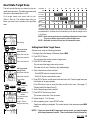
3. You can navigate through each file by pressing the LAP button. Note the file
number on the top line of the screen. Check each file's used memory and delete
any files to free up memory. Delete files by pressing and holding the Start/Stop
and Mode buttons for two seconds. See that the center number (percentage of
total memory used) goes to zero and additional time appears on the lower display.
SET/AT
Complete of
confirmation
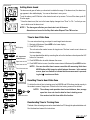
4. Push SET/AT button to return to Maximum Heart Rate MXP.
MSC-2Dx 19