1
EMS 5000 FIREPOINT
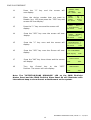
This timer will count down to 0, when the timer reaches 0 the retry should change
to 6 and a message is sent to the sounder. If not, that means the panel is still
busy and the timer will start again, when the retry number decreases listen for
the selected sounder to activate. When the selected sounder has activated it
sounds for four seconds and resets itself, watch the display for the
acknowledgement message. (ACK)
Device 025 Timer 5
Retry 04 REPLY ACK
Push Any Key
Time
If the acknowledgement message has been received and a fault has not been
reported the test is now complete.
17
18
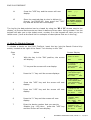
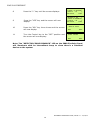
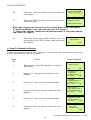
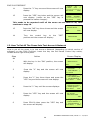
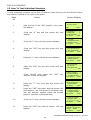
Press Any key and the screen will now display:
| Action :
TEST |
>Do Action
<
| ^^^^^^^^^^^^^^^ |
Yes= Select
Time
Press the “∆” key until the screen displays:
|** Configure **
|
>Sounder : 025
<
| Action : FIRE
|
Yes= Select
Time
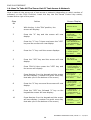
If you want to test another sounder repeat from step 13. If you have finished
testing press the “NO” key until your back to the main screen (shown below).
Then turn the key switch to the “OFF” position.
Status Normal
Date
Time
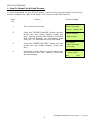
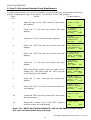
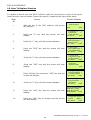
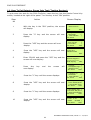
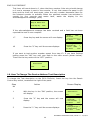
16. How To Change The Device Address Text Description
To change the Text description on the 5000 FirePoint, Insert the key into the Panels
Control Key switch, Located at the right of the panel.
Step
Action
Screen Display
No
1
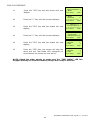
With the key in the “ON” position, the screen
will display:
Panel in Access
Date
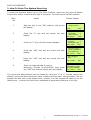
2
3
Time
Press the “0” key and the screen will now
display:
|***Options ****
|
> Passwords
<
| Time and Date
|
Yes =Select
Time
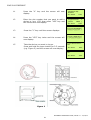
Press the “∇” key until the screen displays:
| Logging
|
>Fire System Opts <
| Remote Access
|
Yes = select
Time
ENGINEERS OPERATING GUIDE, ISSUE 3.0 – 16/08/10
32