1
Statistics
6. Statistics
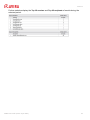
AMES creates statistics regarding the scanned emails, intercepted viruses, spam and
filtered content, per domain and per user. Click the Statistics tab, to check them out.
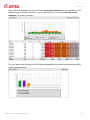
The information about the processed emails is divided into:
•
incoming (green) - the amount of incoming emails; the dark-green segment represents
the incoming emails, for which greylisting was NOT applied. Greylisting is only applied
to catch-all users. See "Greylisting" - page 17.
•
outgoing (blue) - the amount of outgoing emails, if the relay service is enabled.
See 2.4 Scanning outgoing emails - page 9.
•
not scanned (brown) - the amount of not scanned emails, due to disabled filters.
•
Virus blocked (red) - the amount of emails intercepted by the Virus Filter.
•
Spam blocked (orange) - the amount of emails intercepted by the Spam Filter, including
blacklisted items; the dark-orange segment represents the emails stored in the spam
quarantine.
•
CF blocked (grey) - the amount of emails intercepted by the Content Filter.
Note
Statistics are generated daily at 1:00 AM (UTC).
You can change the time range of the statistics, using the select period menu: yesterday,
current month, last month, current year, or the previous year.
AMES User Guide (Status: 24 Jan 2012)
39