1
Crestron CNX-PVID8x3
Professional Video Distribution Switch
Programming Software
Have a question or comment about Crestron software?
Answers to frequently asked questions (FAQs) can be viewed in the Online Help
section of the Crestron website. To post a question or view questions you have
submitted to Crestron’s True Blue Support, log in at http://support.crestron.com./
First-time users will need to establish a user account.
You can create a program that allows you to include the CNX-PVID8x3 in a
Crestron control system using the Crestron programming tools Crestron
SystemBuilder™ and SIMPL Windows. These tools are intended for users with
different levels of programming knowledge. The flexibility of each tool is
proportional to the degree of programming expertise (i.e., the more flexible, the more
a programmer needs to know and account for). Of course, one can initiate
programming using the easiest method (SystemBuilder) and use advanced techniques
that are available from SIMPL Windows to customize the job.
Earliest Version Software Requirements for the PC
NOTE: Crestron recommends that you use the latest software to take advantage of
the most recently released features. The latest software is available from the Crestron
website.
The following are recommended software version requirements for the PC:
•
(Optional) SystemBuilder version 2.0 or later. Requires SIMPL Windows and
Crestron Engraver. Requires SystemBuilder templates 1.10 or later.
•
SIMPL Windows version 2.05.22 or later.
Requires SIMPL+ Cross Compiler version 1.1.
•
Crestron Database version 16.4.4 or later. Required by SIMPL Windows.
•
Crestron Engraver version 2.3.3.2 (required if using SystemBuilder).
Programming with the Crestron SystemBuilder
The easiest method of
programming, but does not
offer as much flexibility as
SIMPL Windows.
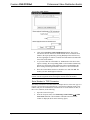
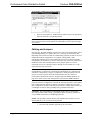
The Crestron SystemBuilder offers automatic programming for such residential and
commercial applications as audio distribution, home theater, video conferencing, and
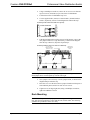
lighting. The interface of this tool guides you through a few basic steps for
designating rooms and specifying the control system, touchpanels, devices, and
functionality. The Crestron SystemBuilder then programs the system, including all
touchpanel projects and control system logic.
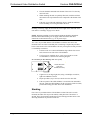
Crestron SystemBuilder is fully integrated with Crestron's suite of software
development tools, including SIMPL Windows, Crestron VisionTools® Pro-e (VT
Pro-e), Crestron Engraver, Crestron Database, User IR Database, and User Modules
Directory. Crestron SystemBuilder accesses these tools behind the scenes, enabling
you to easily create robust systems.
Operations Guide - DOC. 8159A
Professional Video Distribution Switch: CNX-PVID8x3 • 23