1
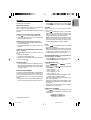
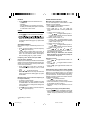
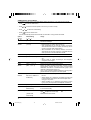
Option
Value/Setting
( or )
(
BRIGHT*
[1, 2, 3, 4, 5, 6]
Select the level of display and button brightness (only when
car headlights are switched on and connected to pin A6, see
'INSTALLATION' (page 5)).
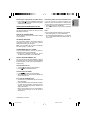
ANGLE
[-1, 0, +1]
Select the viewing angle of the set's display.
or
Usage
)
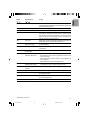
GRAPH*
[OFF, 1, 2]
Activate/deactivate the bar graph.
LOGIC
[ON, OFF]
Select 'ON' to limit the use of the set to one hour when the
car ignition is switched off. Select 'OFF' to prevent the set
from turning on when the car ignition is switched off. (Only
when A7 and A4 are connected correctly, see page 5 for
correct connection of power supply).
LED
[ON, OFF]
Select 'OFF' to switch off the flashing warning light when the
detachable panel is removed with ignition off.
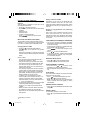
RADIO
[EUROPE,
AMERICA, ASIA]
Select the tuner according to European, American
or Asia standards.
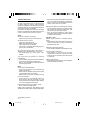
AF
[ON, OFF]
Select 'OFF' to prevent the radio from returning to Alternative
Frequencies.
TUNING
[MANUTUNE,
AUTOTUNE]
Select auto or manual tuning for tuner.
REG/RDS
[REG ON, REG AUTO,
REG OFF, RDS OFF]
– Select 'REG ON' to maintain regional programme,
– Select 'REG AUTO' to switch programme when the next
signal is stronger,
– Select 'REG OFF' to directly switch to the programme of
the next region.
– Select 'RDS OFF' to switch off RDS feature.
SCAN
[PRE SCAN,
FM(MW)(LW) SCAN]
– Select 'PRE SCAN' to enable Preset SCAN or
FM (MW) (LW) scan to enable Frequency scan.
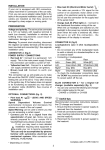
SCANTIME
[5 SEC, 10 SEC,
20 SEC]
Select the scan time (station or track).
MWLW (AM)
[ON, OFF]
Select 'OFF' to suppress MW/LW (AM) when not required.
LO/DX
[LOCAL, DISTANT]
Select 'LOCAL' if you wish to search only for strong stations
during search tuning.
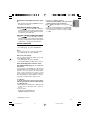
SOURCE
[CHANGER*, AUX IN*]
Select 'SOURCE' connected to connector C3 (CD Changer
or Auxiliary Equipment).
NEWS*
[ON, OFF]
Activate/deactivate NEWS features.
* Depending on version
15
004-16 Mid_Eng
15
8/15/02, 6:48 PM