1
Crestron STX-1550C
2-Way RF Compact Color Touchpanel
Example Program
The STX-1550C or STX-1550CW touchpanel (sold separately) communicates to a
STRFGWX that resides on the Cresnet system. The program is available from the
Downloads page (EXAMPLES Library) of Crestron’s website (www.crestron.com).
Search for STX1550C.SMW. New users are required to register in order to obtain
access to the FTP site.
How the Example Program Works
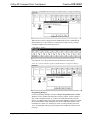
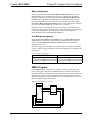
The example STX-1550C SIMPL program is shown below in block diagram form.
(The SIMPL Windows symbol for the STRFGWX is not shown.) For this example,
the touchpanel in a volume control application where UP and DOWN presses ramp a
slider to a volume/tone control module (ST-VC), with a time interval of five seconds.
It also shows digital (signals A), analog (signals B), and serial (signal MSG$)
feedback to the panel. When the touchpanel buttons are pressed, the buttons are
highlighted and the bargraph on the touchpanel moves up or down. When MUTE is
pressed, Channel A of the ST-VC is muted and the text “MUTED” is sent to the
touchpanel. When the ST-VC is unmuted, a blank space is sent to the touchpanel.
Block Diagram of STX-1550C Program
How to Create the Example Program
Configuration Manager
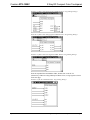
Use the Configuration Manager workspace (Project | Configure System) in SIMPL
Windows to select and configure all the devices that need to be included into the
system. For this example, add a STRFGWX to the system then drop a STX-1550C
onto the STRFGWX. Verify the NET ID as shown on the next page.
CAUTION: The STX-1550C, SIMPL program, and the STRFGWX must be set to
the same NET ID. If changing the default NET ID, do NOT set the NET ID of the
STRFGWX to 1B or the unit will have to be returned to the factory.
Operations Guide - DOC. 5812A
2-Way RF Compact Color Touchpanel: STX-1550C • 17