1
ENGLISH
INSTALLATION
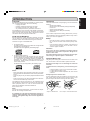
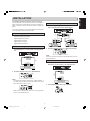
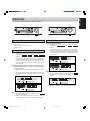
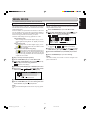
Digital cascade connections
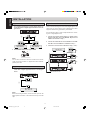
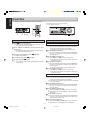
Digital SPDIF connections
1
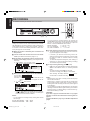
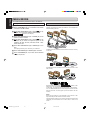
Cascade recording allows, via the LOOP OUT jack, multiple
units to record all using the exact same digital signal. The
LOOP OUT can also be used to pass a digital signal to other
equipment without being processed by the CDR631.
For recording and playing, connect coaxial cables from
the CD-Recorder to digital equipment based on the diagram below:
CD RECORDER CDR631
REC MODE
TR.INCR.
RANDOM
REPEAT
DELETE
STORE
CANCL
MENU
IR
FINAL
ERASE
Recordable
ReWritable
TIME
1
2
3
4
5
PROG
TEXT
6
7
8
9
0
INPUT
STANDBY
POWER
HEADPHONE
LEVEL
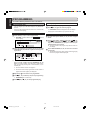
Use the following steps to setup multiple CDR631s for recording from a single digital source:
REC LEVEL/SELECT
0
10
PUSH ENTER
DIGITAL
LOOP
OUT
6
7
IN
DIGITTAL
INP UT
1
Connect the coaxial digital output of a digital source
machine (CD, DAT, etc.) to the DIGITAL IN jack on the
CDR631 as indiacted in step 9.
2
Connect the LOOP OUT of the first CDR631 to the DIGITAL IN on the next CDR631 as indiacted in step 0.
3
Continue to conect units as indicated in step 0 and !.
OUT
DIGITTAL
I NPUT
OUT P UT
O UTPUT
Mixer/Pre-Amp,
DAT, CD/R,etc.
Mixer/Pre-Amp,
DAT, CD/R,etc.
DIGITTAL
2
CD, DAT, etc.
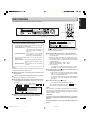
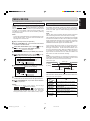
Set AES/EBU-SPDIF switch (34) to SPDIF.
INPUT
OUTPUT
9
LOOP
OUT
IN
DIGITTAL
CD RECORDER CDR631
REC MODE
TR.INCR.
RANDOM
REPEAT
DELETE
STORE
CANCL
MENU
LOOP
OUT
IR
AES/EBU
FINAL
ERASE
Recordable
ReWritable
TIME
1
2
3
4
5
PROG
TEXT
6
7
8
9
0
INPUT
STANDBY
POWER
SPDIF
HEADPHONE
IN
OUT
(SPDIF)
LEVEL
REC LEVEL/SELECT
0
10
PUSH ENTER
IN
Note:
OUT
DIGITTAL
CD RECORDER CDR631
REC MODE
TR.INCR.
RANDOM
REPEAT
DELETE
STORE
CANCL
MENU
LOOP
OUT
IR
You can also connect the LOOP OUT socket on this CD-Recorder to the input sockets of a digital device when DIGITAL
(SPDIF) IN is used.
FINAL
ERASE
Recordable
ReWritable
TIME
1
2
3
4
5
PROG
TEXT
6
7
8
9
0
INPUT
STANDBY
POWER
HEADPHONE
LEVEL
REC LEVEL/SELECT
0
10
PUSH ENTER
IN
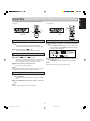
Digital Optical connections
OUT
DIGITTAL
CD RECORDER CDR631
REC MODE
TR.INCR.
RANDOM
REPEAT
DELETE
STORE
CANCL
MENU
LOOP
OUT
IR
FINAL
ERASE
Recordable
ReWritable
1
0
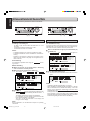
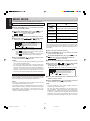
For recording, connect a fiber-optic cable to the CD-Recorder with a digital equipment based on the diagram
below.
TIME
1
2
3
4
5
PROG
TEXT
6
7
8
9
0
INPUT
STANDBY
POWER
HEADPHONE
LEVEL
REC LEVEL/SELECT
0
10
IN
5 CDR631s max.
CD RECORDER CDR631
REC MODE
TR.INCR.
RANDOM
REPEAT
DELETE
STORE
CANCL
MENU
IR
FINAL
ERASE
Recordable
ReWritable
POWER
TIME
1
2
3
4
5
PROG
TEXT
6
7
8
9
0
INPUT
STANDBY
HEADPHONE
LEVEL
REC LEVEL/SELECT
0
10
PUSH ENTER
DIGITAL
IN
8
OU TP U T
Mixer/Pre-Amp,
DAT, CD/R,etc.
Note:
Before Connecting the cables, remove the dust caps from the
digital optical connections. We recommend that you save the
caps.
6
CDR631(U)_Eng_P01-11.p65
6
PUSH ENTER
8/4/00, 9:29 AM
OUT
!