1
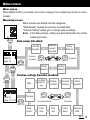
Menu screen (Function settings)
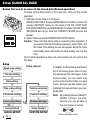
Function setting
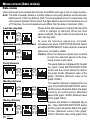
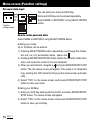
The function setting screens allow you to change various programmed functions. Current
settings for each parameter are displayed on the appropriate function setting screen (except for display contrast and personal data).
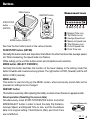
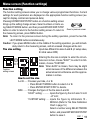
Pressing ENTER/START/STOP button on a function setting screen
brings up the setting change screen. Select numbers or items using SELECT/MODE button, and then press ENTER/START/STOP
Goes to previous screen
button in order to return to the function setting screen. To return to
the measuring screen, press MENU button.
Note: To return to the previous screen during the setting operation, press the two SELECT/MODE buttons simultaneously.
Caution: If you press MENU button in the middle of the setting operation, you will immediately return to the measuring screen, and all unsaved changes will be lost.
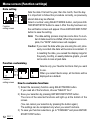
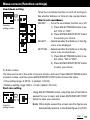
Tire size setting
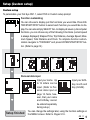
Inputs two different tire sizes A and B. (A: setup value,
B: initial value 2050)
ENTER
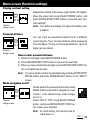
Entering the tire size is simple: to enter the circumference in inches, choose "EASY"; to enter it in millimeters, choose "CUSTOM".
Note: When EASY is chosen, there may be slight
errors because of the difference between the
actual wheel circumference and the approximation in inches.
How to set tire size
A or B ..... Chooses your bike, A or B.
• Press SELECT/MODE button to select A or B.
• Press ENTER/START/STOP to decide.
SIZE ...... Changes the figure of the tire sizes A and B.
“EASY” setting: ........... inputs the figure by the inch size 14 inch
- 27 inch;
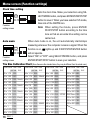
“CUSTOM” setting: ..... inputs the figure by millimeters 10 9999mm (Refer to Tire Size Calibration
Chart in page 16.)
Select a number using SELECT/MODE
button, and press ENTER/START/STOP
button to save it.
OS 1.1
(START/STOP)
Function
setting screen
11