1
ISO 9001|ISO 14001|OHSAS 18001
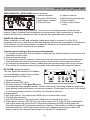
Press PROG button ,the menu will display on the screen as following:
PROGRAM
1--:-2--:-3--:-4--:--
5--:-6--:-7--:-8--:--
9--:-10--:-11--:-12--:-play
13--:-14--:-15--:-16--:-clear
In the picture T means TITLE, C means CHAPTER. The divided unit of
DVD disc is title, and can divide the title for several chapters.
Usually one movie has one title.
Some disc are not divided in this way, please pay attention to it when
operate GOTO” and “PROG” function.
Input relevant title, chapter that you want with the arrows and number
keys.
Use ↑↓←→ to move the cursor to “PLAY” in the picture above, then
press “ENTER” button .the player will start playing follow the
programmed order.
Also use the same way to move the cursor to “CLEAR” and press
“ENTER” button can clean the programmed order.
Press “PROG” key again will exit the program mode.
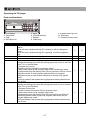
PBC
The key only act for VCD disc.
V
AUDIO
In play state, press “AUDIO” key can choose different audio channels
in the DVD disc.
V
ZOOM
In play state, press “ZOOM” key ,the display screen will zoom by
2X, 3X, 4X, 1/2X, 1/3X, 1/4X and normal play.
V
SLOW
Press “SLOW” key ,the set will become slow motion as following cycle:
SF ½→SF 1/3→SF 1/4→SF 1/5→SF 1/6→SF 1/7→normal→SF ½→...
V
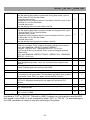
↑↓←→
ENTER
Cursor move keys and confirm keys.
V
REV-SKIPCUE
Press one of these keys to skip to the next track, long press one of these
keys will search forward or backward.
ANGLE
Press “ANGLE” to choose different angles of the disc that recorded with
multi-angle. It doesn’t work if the DVD disc doesn’t support multi-angle.
V
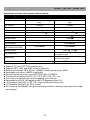
When this key is pressed, it will become random play mode.
V
SUB-T
In play state press “SUB-T” button to choose the different subtitles in the
DVD disc.
V
SETUP
Press “SETUP” key to enter setup manual.
V
TITLE
Press “TITLE” key the screen will show title and manual for selection.
V
VOL.-
When this key is pressed, the volume will decrease by 1dB per step, the
minimum volume is 0dB.
V
VOL.+
When this key is pressed, the volume will increase by 1dB per step, the
maximum volume is 40dB.
V
You can use these keys to select the track you want directly.
V
RANDOM
0~9;10+
-14-
V
V