1
ISO 9001|ISO 14001|OHSAS 18001
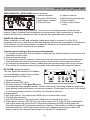
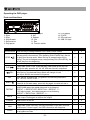
FOLDER-UP
In stop mode:
Skip the starting play folder to next folder during stop mode, cyclic to
the first folder if it is in the last folder.
In program entry mode:
Change the file for program select to next folder’s first file, cyclic to the
first folder if it is in the last folder.
In normal play mode:
Skip the playing file to the next folder’s first file.
FOLDER-DOWN In stop mode:
Skip the starting play folder to previous folder during stop mode, cyclic
to the last folder if it is in the first folder.
In program entry mode:
Change the file for program select to previous folder’s first file, cyclic to
the last folder if it is in the first folder.
In normal play mode:
Skip the playing file to the previous folder’s first file.
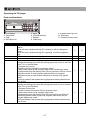
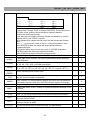
REPEAT
In mp3 mode and in USB mode .
If this key is pushed, PLAY mode is changed cyclically shown below.
PLAY ALL RANDOM→REPEAT TRACK→REPEAT
FOLDER→REPEAT ALL→RANDOM REPEAT→PLAY ALL
IN CD mode If this key is pushed, PLAY mode is changed cyclically
shown below.
PLAY ALL RANDOM→REPEAT TRACK→REPEAT ALL→RANDOM
REPEAT→PLAY ALL.
EJECT
When this key is pushed, door is moved out.
PROG
Set to programming mode.
When programming mode, “stop” key is pushed then program is all
cleared.
MUTE
When this key is pushed during CD is playing, the set will mute the
output. Pushing again can recovery the output.
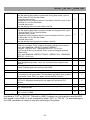
POWER
ESP
ID3
0~10
VOL.VOL.+
Power SW of the set.
In CDDA mode, Press ”ESP” key, The ESP display lighted and the set
is in electronic anti-shock state. The electronic anti-shock time is about
40 seconds. Press “ESP” key again, cancel the ESP function.
When this key is pressed , the“ID3”in the LCD display will flash, and the
ID3 TAG is displayed pressing this key again will cancel the ID3
function
You can use these keys to select the track you want directly.
When this key is pushed, the volume will decrease by 1dB per step, the
min. volume is 0dB.
When this key is pushed, the volume will increase by 1dB per step, the
max. volume is 30dB.
V
V
V
V
V
V
V
V
V
V
V
V
V
V
V
V
V
V
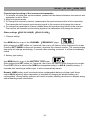
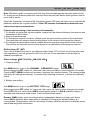
Caution: This player does not accept 8-cm diameter CD. User is advised to have the USB 2.0
formatted in “FAT” or “FAT 32”. The built-in USB 2.0 player can not be able to read the MP3
files stored in your USB if it is not formatted by either “FAT” or “FAT-32”. To avoid damage to
the USB, remember to detach it only after switching off the player.
-12-