1
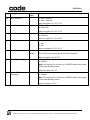
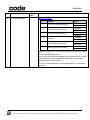
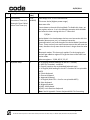
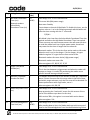
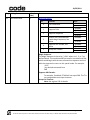
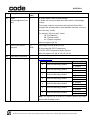
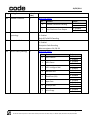
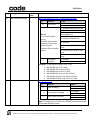
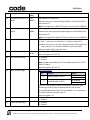
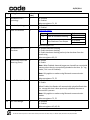
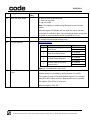
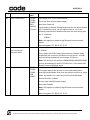
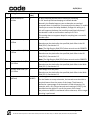
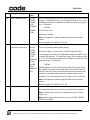
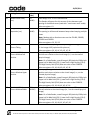
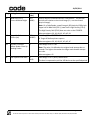
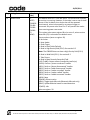
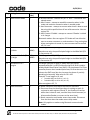
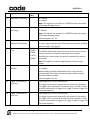
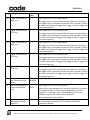
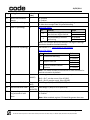
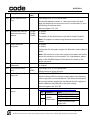
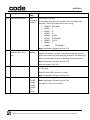
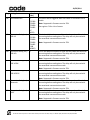
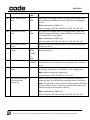
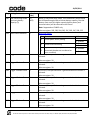
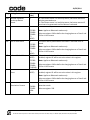
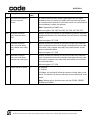
10/29/2014 6.3 Command Types # Causes the Reader to beep and vibrate the specified number of times; data contains the number as a single character in the range [0,127]. (The Reader will respond with d or e.) Example – beep three times: #%03 Note: Behavior is defined per platform. CR900FD/CR1000/CR2300/CR8000 – Beep three times. CR1400/CR2600/CR3600/CR6000 – Beep and vibrate three times. $ ( Note: Readers with a vibration motor are the CR1400, CR2600, CR3600 and CR6000. Posts an event to the Reader; data contains the event number as a single character. See register 39 in Section 8 for a list of the event numbers. (The Reader will respond with d or e.) Causes the Reader to upload any logged error messages (no data) (The Reader will respond with a g packet, zero or more z packets, and a final d or e. Each z packet contains a portion of the requested data in its data field. ) Note: This is very similar to the response to the X command; however, p packets are not applicable and the g and d/e packets are not suppressed even in raw mode.) Causes the Reader to erase its log of error messages (no data) , (The Reader will respond with d or e.) Causes the Reader to send a list of current Reader settings (no data) (The Reader will respond with d containing a space-separated list of all setting values (in order, expressed as hexadecimal ASCII characters) or with e.) / (see ‘<’ command for saved Reader settings) Toggle a bit (or bits) in a Reader setting; data contains a printable ASCII string in the following format: hexadecimal register number in parentheses followed by a 32-bit signed integer value, expressed in ASCII hexadecimal characters (with optional minus sign) or ASCII decimal characters preceded by the ‘#’ character, e.g., /(2e)1000 or /(2e)#4096; the specified integer is XOR’ed with the existing setting value. The way a / command is handled is equivalent to a P command – the effects are immediate but won’t survive a reboot. If you want the setting to be set after a reboot, issue a / then W or use the newer C/ combination. (The Reader will respond with d or e.) 1 Note: see Section 8 for possible Reader settings. Indicates the start of a file download; data is empty. This command is followed by a sequence of 2 commands containing the file data and a download-end command (e.g., 5). (The Reader will respond with d or e.) Page 11 of 72 © 2014 The Code Corporation 12393 South Gateway Park Place Suite 600, Draper, UT 84020 (801) 495-2200 FAX (801) 495-0280