1
CHECK PROCEDURE FOR INSTALLERS FOLLOWING INSTALLATION
THIS CHECK PROCEDURE SHOULD BE CARRIED OUR BY A COMPETENT INSTALLER ONLY.
THE OPERATING INSTRUCTIONS ARE AVAILABLE FOR END USERS.
DuoHeat has a built in self diagnostic function that enables
both service engineers and end users to diagnose faults.
Make sure that the peak supply is on before starting the
diagnostic function.
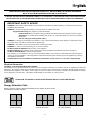
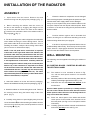
Adjust the LED’s down until only the blue frost protection
LED is illuminated.
Press and hold the
button for 10 seconds until the blue
LED goes off then release the
button.
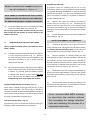
The LED’s will now come on one at a time - this indicates
that the radiator is running the diagnostic checks.
A flashing LED will then illuminate to indicate a pass or fail.
-
2.
To check the radiant panel operation (comfort
heat).
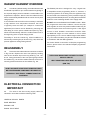
(i) Adjust the temperature control display as follows;
press down the
button until all red bars are
illuminated (shown below). After 2 minutes the
front panel should now feel warm, this will confirm
correct operation.
+
-
Pass - 8th LED flashes - if Wall Mounted Programmer
(RXPW4/RXMBS4) is not
connected or in Comfort Mode.
(ii) If the front panel does not heat up and room
temperature is below 26°C, remove front panel
and ensure there is no damage to front panel or
radiant element and that all electrical connections
are secure. If front panel is still not heating up,
phone customer help line.
Pass - 9th LED flashes - if Wall Mounted Programmer
(RXPW4/RXMBS4) is in Setback
mode.
NOTE:
If room temperature is above 26°C, radiator
will not operate.
Fault Conditions
1st Red LED flashing - Room temperature sensor fault.
IMPORTANT
2nd Red LED flashing - Core temperature sensor fault.
Once radiator has been confirmed as fully
operational, use Page 2 of the ‘Operating
Instructions’ to set up initial customer
settings.
Please ensure the “Operating Instructions” are
left with the radiator for user information.
3rd Red LED flashing - Radiant Panel temperature fault.
- +
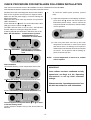
To exit diagnostic mode press either
or
to return
to normal running mode.
Contact Customer Helpline if any of the above faults are
detected.
- 12 -