1
Operating the DVD player
Parts and functions
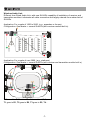
6 5 4 3 2
PLAY
PAU SE
13
14
SD/MM C CARD
16
15
FU NC
REV-SKIP-CU E
REV
CUE
STOP
EJECT
REPEAT
N /P
12 11 10 9 8
1. Power/volume control
2. Eject
3. Stop
4. Skip/forward
5. Skip/reverse
6. Play/pause
1
POWER / VOL
VIDEO
7
7. Video output
8. N/P
9. Repeat
10. Cue
11. Rev
12. Function switch
Keys
13. LCD display
14. IR LED
15. SD card input
16. USB 2.0 input
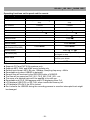
Finction
PLAY/PAUSE Press this key to change between PLAY and PAUSE modes.
Panel Remote
V
V
When this key is pressed during playing, the set is changed to stop.
The stop point is memorized. Then pressing PLAY/PAUSE key, the set
will play from the stop point. When this key is pressed twice during
playing. The set is changed to stop, then pressing PLAY/PAUSE key, the
set will play from the beginning.
V
V
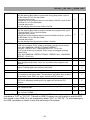
When this key is pressed, mode is changed between USB and disk.
V
V
In play state, press “CUE” to do fast play. Each press of the key can
change the play speed to X2, X4, X8, X20 and normal in sequence.
V
In play state, press this key to carry out the fast backward play. Every
press the key, the backward play speed will change for one
time.X2,x4,X8,X20 and normal in sequence.
V
Press the key to change the TV system in the following sequence:
PAL→AUTO→NTSC→PAL→...
V
EJECT
Press this key, the disk will move out.
If the disk is not taken away, press this key again, the disk will slot in.
V
REPEAT
The default is REPEAT ALL
IN MP3 WMA state ,the repeat sequence is as following:
REPEAT 1→REPEAT DIR→REPAT ALL→REPEAT 1→...
In CD playing state , the repeat sequence is as following:
REPEAT 1→REPAT ALL→REPEAT 1→...
V
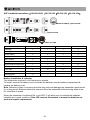
STOP
FUNC
CUE
REV
N/P
MUTE
POWER
GOTO
When this key is pressed during disc is playing, the set will mute the
audio output. Press again to recover the output.
Power switch of the set.
V
V
V
V
V
Press GOTO to reach the title, chapter or time you want.
V
OSD
In play state, press OSD key, the play information of the disc will show
on the screen. Press it again, the OSD information will disappear.
V
PROG
After programming, the player will play the title, chapter or songs follow
the programmed order.
Press PROG button ,the menu will display on the screen as following:
V
-13-