1
Operating procedures
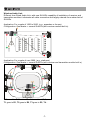
After unpacking the unit for the first time, please charge the unit for at least 6 hours before
operation. This is absolutely necessary as the built-in rechargeable batteries might have been
discharged naturally due to long shipment and storage time, even though it has been fully
charged in the factory prior to shipment.
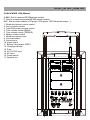
To operate this portable sound unit, switch on the main POWER switch. If the Battery low
indicator also glows, it means the batteries are weak and please recharge them.
The main POWER switch does NOT switch on the other devices as each of them has individual
Power/Volume control. To operate each of them, you must switch them on accordingly.
Operating the dynamic wired microphone
To use a cable microphone, simply plug it into the MIC IN socket. The mic socket accepts both
phone and Cannon jack. Rotate the dedicated volume control knob and master volume control,
amplified sound could be heard from the speaker when voice is spoken into the cable
microphone.
Operating the wireless microphone system
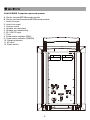
To operate the wireless system, just switch on the power/volume control on the module panel
and the matching transmitter. Please set the same channel on both the transmitter and receiver
before operation. Please as well make sure that master volume control is set to minimum level
before turning the unit on, especially working on a wireless version! Set the Master volume
control to the mid position. Rotate the volume control knob on receiver panel clockwise to the
desired levels. When voice is spoken into the transmitter, amplified sound should be heard over
the built-in speaker.
Voice Priority (Ducking) operation
Voice Priority operation is only necessary when CD or other acoustic device is playing. If the
Voice Priority switch is put to ON position, the ducking function will be activated. While the
music is playing, a voice input from either a wired or wireless microphone will temporarily
override and turn down the volume of the background music and voice could be heard clearly.
Background music will return to its original setting when no audio input is entering the
microphone for a certain time. However, if the microphone is not switched off, the music
entering the microphone will also activate the voice priority function. So, Voice priority is best
operated using microphones with on/off switch.
Battery Charging
Internally, the CHALLENGER 1000 contains two 12V/5AH maintenance free lead acid batteries,
which have no memory effect.
When the batteries are weak, the battery low indicator LED will stay RED. To charge the
batteries, simply plug in the AC power supply, the charging process will start automatically.
While charging, the charging indicator will flash GREEN. When batteries are fully charged, the
charging indicator will stay GREEN.
-5-