1
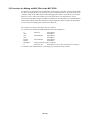
3.5 Procedure for Making an MCU File for the M3T-PD30
It is necessary to change the contents of the MCU file according to the MCU to be developed. Make
the MCU file M30100.MCU for M30100 Group and M30102.MCU for M30102 Group in the
"mcufiles" folder in the folder where emulator debugger M3T-PD30 is stored. When you use M3TPD30 Ver.4.10 or older, make an MCU file in the folder where your M3T-PD30 is stored.
The contents of the MCU file give the addresses of SFR area, internal RAM area, internal ROM area
and the name of the firmware file. Change the contents of the MCU file according to the target MCU.
Use your editor for changing the contents of the MCU file.
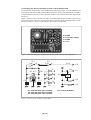
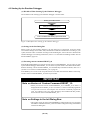
The examples of contents of the MCU file are as follows:
For 30100 Group, 1KB RAM, 24KB ROM (file name: M30100.MCU)
0:
3FF:
400:
7FF:
FA000:
FFFFF:
M30620B:
0:
SFR area
Start address
End address
Internal RAM
Start address
End address
Internal ROM
Start address
End address
Name of firmware (Do not change.)
Expansion No.
M3T-PD30 V.4.00 or later required (Do not change.)
Use the MCU file "M30100.MCU" in the floppy disc included with this product.
( 30 / 52 )