1
Composer Pro User Guide
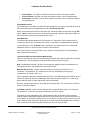
7. Are strange things happening to the devices?
•
Make sure all ZigBee devices are updated to the latest firmware.
•
Make sure Director and Composer Pro are using the same version.
•
Disconnect and identify any problematic devices again.
•
Powercycle all IP devices.
• Be patient.
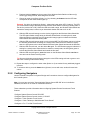
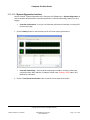
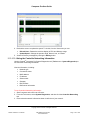
8. Turn on Diagnostic Logging (in Composer Pro, Tools > System Diagnostics > Logging > Start).
Use the Logging tool to determine what was happening on the system. Can you duplicate it, and
is there a workaround? For details, see “Logging Diagnostics Information.”
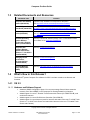
Tip: Report any problems during the update process to:
Control4 Technical Support: http://www.control4.com/residential/products/resources/#techsupport
Email: [email protected]
Telephone: 1-888-400-4072
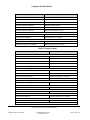
Status Message
Description
Resolution
1. Device IP address detected with
a different version — update
needed.
The Director discovered a device
that is a different version than the
Director box.
Perform update.
2. Device IP address indicated it
needs to be updated.
The device sent a status message
to the Director that says it needs to
be updated.
Perform update.
3. Finished update attempt.
Current update is completed. A
separate message notifies you of
how many devices succeeded or
failed.
(Status message only) No action is
required.
4. Update information was missing
or invalid. Reinstall the files for the
USB drive, and attempt the update
again. If the problem persists,
contact Technical Support.
A Director could not find the
matching update information for a
device retrieved from the USB
drive. This would be the case if files
were deleted from the USB drive.
Re-install the files for the USB
drive, and attempt the update
again. If the problem persists,
contact Technical Support.
5. Update information was missing
or invalid. Contact Technical
Support.
The Director could not find the
matching update information for a
device retrieved from the Web. The
database contains invalid data.
Contact Technical Support.
6. Director device is not yet
identified. Please identify the
Director device and attempt the
update again.
The system has not yet discovered
the Director device.
Identify the Director device, and
perform the update again.
7. Starting update to version
<targetVersion>. Director version is
<version of Director>.
An update has started.
(Status message only) No action is
required.
8. Detected USB device containing
update information. The USB
device will be used for the update.
The system has detected a USB
drive.
(Status message only) See "Update
from 1.3.x Release with a USB
Stick" in “Information About Older
Releases” for information about
Copyright © 2012 Control4. All Rights Reserved.
Saved: 1/20/2012 1:31:00 PM
200-00005 Composer Pro
User Guide Part 1
Page 167 of 199