1
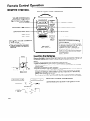
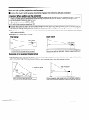
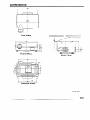
Location of Controls
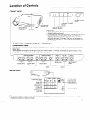
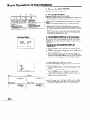
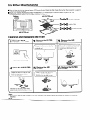
FRONT VIEW
POWER (ON/OFF)
button
POWER indicator
LAM’P REPLACEMENT
indicator
TEMPERATURE
WARNING indicator
REMOTE SENSOR
(intake vent)
SPEAKER
AIR FILTER
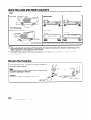
CAUTIONS:
l
l
OPERATION
Allow at least 10 cm of space between the cooling fan
(exhaust vent) and the wall.
If the cooling fan becomes obstructed, a protection device will
automatically turn off the projector lamp. This does not
indicate a malfunction. Remove the projector plug from the
wall outlet and wait 10 minutes. Then turn on the power by
plugging the cord back in. This will return the projector to its
normal mode.
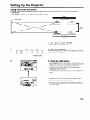
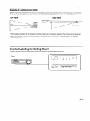
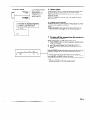
PANEL ON SIDE OF PROJECTOR
Phosphorescent Display
The operation controls on the right side use a phosphorescent display for easy viewing. When exposed to surrounding
light, the phosphorescent
display will glow in the dark.
(Glow ratio)
When exposed to sunlight or other light of 500 Iux or more for about 10 minutes, the display will glow for about 1 hour,
(Note:-500 Iux = 1-l .5m directly under a 40W fluorescent light.)
I
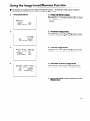
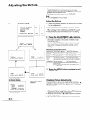
ADJUSTMENT
(d/b) buttons
I
I
J
MUTk button
INPUf SELECT
ADJUSTMENT
ADJUSTMENT
button
(d/b) buttons
(V/A) buttons
T
MENU button
LENS ADJUSTMENT
VOLUME UP-DOWN
button
buttons
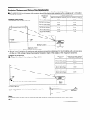
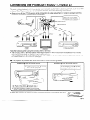
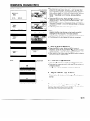
REAR VIEW
MAIN POWER switch
COMPOSITE
VIDEO
INPUT 1
Audio: RCA
Video: RCA
COMPOSITE
S-VIDEO INPUT 1
(4-pin mini DIN)
WIRED REMOTE
CONTROL INPUT
VIDEO INPUT 2
Audio: RCA
Video: RCA
COMPOSITE
VIDEO OUTPUT
DC 12V OUTPUT
Audio: RCA
Video: RCA
Note:
l
If a current of 200mA or more is drawn from the DC 12V OUTPUT jack, a protection
projector and leave it in Stand-by mode.
device will automatically
turn off the