1
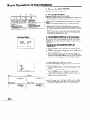
Adjusting the Picture
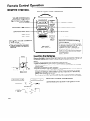
This projector’s
picture is factory preset to standard
settings. However, you can adjust it to suit your own
preferences
with the VIDEO ADJUSTMENT
buttons on the
projector
and the remote control.
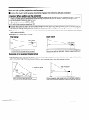
l Five picture
modes can be adjusted:
“PICTURE”,
“BRIGHT”,
“COLOR”,
“TINT” and “SHARPNESS”.
Note:
l TINT
only appears in NTSC mode.
l
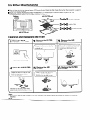
Adjust the Picture
1
On-Screen
7
ADJ. 6l STATVSl
VIDEO
,VIDxO
ADJ.
BACXaxOVND
uAsxma
IYAax
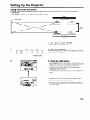
1. Use the MENU button to select the mode
to be adjusted.
Display
vsa
vsa
a
STATVSl
LXVSL
ADJ.
ADJ.
BYBTXRI
LAROVAQX
AW:SXL.~,:ADJ.
l
SIT
tNCXT
YBNVrNBxT
When the MENU button is pressed, the MENU mode is
indicated
for about 30 seconds.
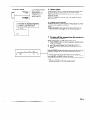
Press the ADJUSTMENT
V/A buttons to select “VIDEO ADJ. 1_1 STATUS 1”) then
press the 4,
buttons to select the STATUS l-5 settings.
Press the MENU button after selecting
STATUS setting.
l
. . . 5
5
I
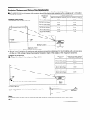
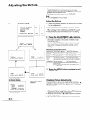
2. Press the ADJUSTMENT
BTATVSl
PICTVRI
-
0
I
::
l
l
..rSlL. 4,rADJ. NENVrlND
l
Description of Adjustment
1Selected item
1
~
STATVBl
0
-
8KARPNLI)S
ITATVIL
+
BRIOKT
-
AV:I)BL.4,:AD.T.YKNV:LND
..‘tsKL.
buttons.
To
4
Items
1
(
b
1
1
I
_
0
*
,
:
I
4,tADJ.
q/b
If the VIDEO ADJUSTMENT
T/A buttons are pressed while
the mode is indicated on the screen, the MENU mode
changes
as shown.
When the ADJUSTMENT
(4) or (b) buttons are pressed
while the mode you want to adjust is indicated,
the ” 0”
mark, which indicates
the adjustment
setting, can be
moved.
The adjustment
mode is indicated
for about 10 seconds.
l
I-
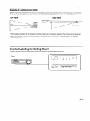
For less colour
COLOR
NKNVtEND
I
(
(
/
1
Press the MENU button
STATVS
TINT
AVrlKL.
l
-
ITATVIl
1
0
NENVrLND
TINT: NTSC
On-Screen
..rlBL.
exit
l
t
COLOR
4,zADJ.
I
4,rAD.J.
YKNfJrKND
only
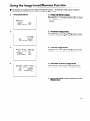
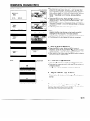
Checking Picture Adjustments
Display
When video mode is
selected.
-
STATVSl
bPICTVRS
BRIOHT
COLOR
TINT
0
I
I
+
the MENU button
pressed, the MENU mode is
indicated
for about 30 seconds.
Press the ADJUSTMENT
vi
A buttons to select “VIDEO ADJ. 1-_1 STATUSl”, then press
the MENU button.
I
SEARPNESB
-
RLSBT
ATtSxL.
4brADJ.
XxNVrxND
l
l
TINT: NTSC only
l
l
Each time you press the ADJUSTMENT
‘I/A
buttons
the display is shown, the F mark will move to indicate
selected video status item for adjustment.
When the ADJUSTMENT
(b) buttons
”
while
the