1
Using the SoundPoint® IP Backlit Expansion Module
3
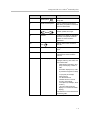
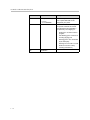
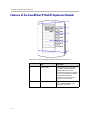
Item
Description
Line Indicators
Individual multi-color LEDs display
the dynamic call state and remote
user status (busy lamp field [BLF] and
presence). The mapping is:
Solid green—An active call is in
progress.
Fast flashing green—There is an
incoming (ringing) call.
Flashing green—Another party has
put you on hold.
Flashing red—The call is on hold.
Solid red—The line is busy remotely
(shared lines).
4
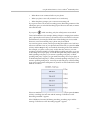
Graphic Display
Shows information about lines or
speed dials.
5
Infrared Lens
Facilitates communications to the
host phone and other Expansion
Modules.
Adjusting the Display Contrast
To adjust the display contrast on a SoundPoint IP Backlit Expansion Module,
refer to Changing the Display Contrast on page 2-3.
Adjusting the Backlight
To adjust the backlight on a SoundPoint IP Backlit Expansion Module, refer to
Changing the Backlight Intensity on page 2-4.
Placing Calls
When you connect a SoundPoint IP Backlit Expansion Module to your phone,
you can place a call using one of the Line Keys.
5-5