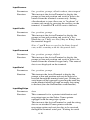
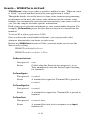
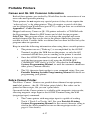
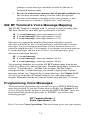
1
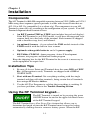
code used for the storage of computer data tapes. Enabling the tape label
code (C) does not disable reading of Code 128 or Code 39 bar codes.
•
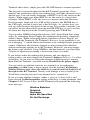
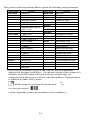
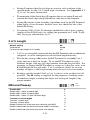
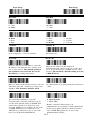
Bar Code ID’s are characters assigned to each bar code type to identify
that particular type of code. These Bar Code IDs can be output as a
prefix to the bar code data to identify what type of bar code you are
using. The Bar Code ID’s are assigned as follows:
Bar Code
Codabar
Code 39
UPC-A
EAN-13
I 2of5
ID
a
b
c
d
e
Bar Code
2 of 5
Code 128
Code 93
MSI
UPC-E(0)
ID
f
g
i
j
n
Bar Code
UPC-E (1)
EAN-8
RSS-14
StorageTek
Plessey
ID
Bar Code
ID
o
p
r
s
x
LabelCode 4
LabelCode 5
y
z
The ID character is transmitted in front of the bar code data.
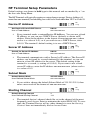
Bar
Codes
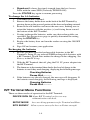
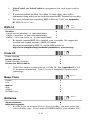
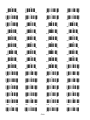
Codabar
Enable Codabar
Disable Codabar
Enable CLSI Codabar
Disable CLSI Codabar
Disable Start/Stop character transmission
Enable Start/Stop character transmission
0
1
2
3
4
5
•
CLSI is a form of Codabar often used by libraries.
•
Setting 5 will transmit the Codabar start and stop characters with the bar
code data to your computer. If you are varying the start and stop characters
to differentiate between different labels, transmitting the start and stop can
be helpful. See Appendix G; Codabar for more information.
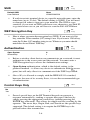
Bar
Codes
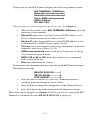
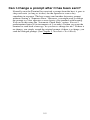
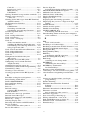
2 of 5 Code
Enable Interleaved 2 of 5
Disable Interleaved 2 of 5
Enable Interleaved 2 of 5 check digit
Disable Interleaved 2 of 5 check digit
Enable check digit transmission
Disable check digit transmission
Enable Standard 2 of 5
Disable Standard 2 of 5
Enable UPC- E1
Disable UPC- E1
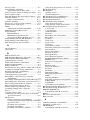
Normal Code 39 decode (Laser scanners)
Loose Code 39 decode (for use with LZ400 thru windshields)
Looser Code 39 decode (for use with LZ400 thru windshields)
2-12
0
1
2
3
4
5
6
7
8
9
B
C
D