1
Index
1
1 second voice messages............................ 7-2
1/2 second voice messages......................... 7-2
2
2 of 5 Code ............................................... 2-12
default length setting ........................... 2-13
enabling check digit ............................ 2-13
susceptible to mis-reads......................... 2-13
2 of 5 Codes
reading variable length bar codes ....... 2-13
2 of 5 Length ............................................ 2-13
4
4 digit year option .................................... 2-15
4 second laser beam.................................. 2-17
6
6 beeps on power up................................... 8-4
default settings....................................... 2-2
ID character prefix .............................. 2-11
Base Shut Down ......................................... 6-5
Basic RF System communications............. 3-1
Batteries.................................................... 2-14
battery charging.......................................... 1-4
Battery Life indicator ................................. 1-3
Battery Status indicator ............................ 2-15
Baud Rate for serial printer ...................... 2-18
Beep Tone................................................. 2-14
Beeping
and Accumulate Mode ......................... C-6
changing the tone or pitch ................... 2-14
during setup configuration....................... 2-2
Beeping a lost unit...................................... 3-3
Before you begin programming ................. 5-1
BEGIN key
transmitting ASCII 23 to host ............... 6-6
bright light problems
aiming dot...............................................J-3
C
A
access point location................................... 4-1
access point scan results............................. 4-2
Accumulate Mode ..................................... C-6
numeric barpad table ............................ C-6
ActiveX drop-in component....................... 6-1
ActiveX programming ............................... 6-4
Advanced Features/Functions for
Code 39................................................. C-4
AIAG ......................................................... C-3
aiming dot................................................... J-2
Aiming Dot Duration ............................... 2-17
aiming dot enabling.................................... J-3
Array examples for VB .............................. 6-3
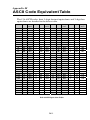
ASCII Code Equivalent Table ................. M-1
Authentication ............................................ 2-6
automatic check back ................................. 2-9
Automobile ID reading .............................. J-3
Automobile windshield reading ................. J-3
Avoiding substitutions in scanning ............. 2-17
B
B11 Rubber Boot for Integrated Laser RF
Terminal ................................................L-4
Backlight Display....................................... 2-7
Backlight Duration ..................................... 2-7
Bar Code ID's ........................................... 2-12
Bar Code Menu Only setup parameters ..... 2-1
bar code symbol ......................................... 2-4
Bar Code Type identification ................... 2-11
Bar Codes
Accumulate Mode ................................ C-6
Cable pin-outs ........................................... A-1
Cables
needed for voice message cloning ........ 7-5
Cables for Zebra Cameo Printer ................. A-1
Cameo Printer........................................... 6-17
Cameo Printer Pin-outs .............................. A-1
Cannot Communicate with PIC Processor. 8-3
Caps Lock ON
Code 39 setup parameter..................... 2-10
CCD pin-outs............................................. A-1
Change Batteries ........................................ 8-3
CHANGE BATTERIES............................. 1-3
changing a host prompt already sent.......... 2-9
Changing a prompt ..................................... 3-3
Changing more than one setup parameter at
a time using the bar coded setup menu . 2-3
Changing the AA batteries on the RF
Terminal ................................................ 1-4
Changing the default voice messages ........ 7-4
Changing the Device IP Address ............... 2-5
Changing the RF Terminals automatic shutoff time ................................................ 2-16
Changing the Starting Channel .................. 2-5
Changing the Subnet Mask .................2-5, 2-6
Changing the voice message partitions...... 7-2
charging batteries in RF Terminal ............. 1-4
Check Character Code 39.......................... C-4
Check digits / Checksums
and Accumulate Mode ......................... C-6
Check Digits / Checksums for Code 128...F-1
Code 39................................................. C-4
1