1
Appendix O
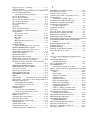
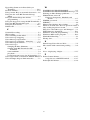
802 RF Terminal Setup Menu
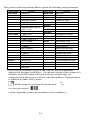
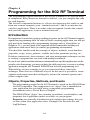
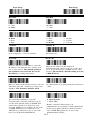
To change a setting using the 802 RF Terminal Setup Menu:
• Scan START SETUP to enter setup mode
• Scan the parameter you want to change (i.e. Code 3 of 9)
or
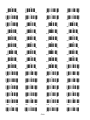
• Choose the setting you want to change and scan the corresponding letter
number from the Barpad Table (0-9, A-F)
• When all changes have been made, scan END SETUP
• * indicates default settings
Start Setup
End Setup
*/+/*
*/-/*
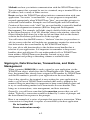
Code 3 of 9
UPC/EAN
*/A/*
*/B/*
*0
1
*2
3
*4
5
6
*7
8
*9
A
*B
C
*D
Enable Code 39
Disable Code 39
Enable Full ASCII Code 39
Disable Full ASCII Code 39
Enable Accumulate Mode
Disable Accumulate Mode
Transmit Start/Stop characters
Don’t transmit Start/Stop characters
Enable Mod 43 Check Character
Disable Mod 43 Check Character
Transmit Mod 43 Check Character
Don’t transmit Mod 43 Check Character
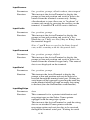
Caps Lock ON
Caps Lock OFF
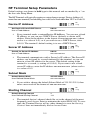
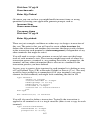
*0
1
2
*3
*4
5
*6
7
8
*9
A
*B
*C
D
*E
F
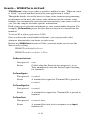
Enable UPC/EAN
Disable UPC/EAN
Enable Supplements
Disable Supplements
Transmit UPC-A NSC
Don’t transmit UPC-A NSC
Transmit UPC-A Check Digit
Don’t transmit UPC-A Check Digit
Transmit UPC-E NSC & EAN-8 Flag Ch
Don’t transmit UPC-E NSC & EAN-8 Flag Ch
Transmit UPC-E & EAN-8 Check digit
Don’t transmit UPC-E & EAN-8 Check digit
UPC-E Compressed transmission
UPC-E Expanded transmission
EAN-8 observes 9 & A above
EAN-8 is forced to transmit 8 digits always
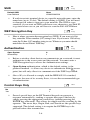
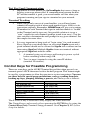
2 of 5 Code
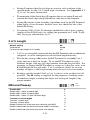
2 of 5 Length
*/C/*
*/5/*
0
*1
2
*3
4
*5
6
*7
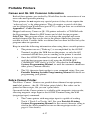
Enable I 2 of 5
Disable I 2 of 5
Enable check digit
Disable check digit
Transmit check digit
Don’t transmit check digit
Enable 2 of 5
Disable 2 of 5
Scan 2 digit length (default is 06)
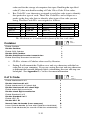
RSS-14
*/%/*
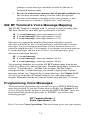
0 Disable RSS-14 2 14 + Identifiers
1 Standard 14 digits 3 14 + UCC-128 Emulation
O-1