1
(Continued)
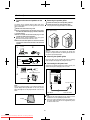
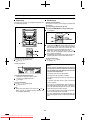
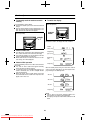
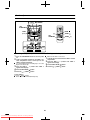
To specify station names and select stations manually (station select)
You can receive a desired station by specifying the station
name (BBC R1, BBC R2, etc.) from among the stations that
have been stored in memory. (ASPM is convenient for storing stations in memory.)
Before starting this operation, you must store one or more
station names in memory.
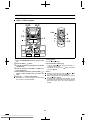
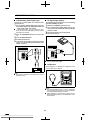
(Main unit operation)
To cancel the station select operation:
Press the STATION button whilst "STATION" and "SELECT"
appear alternately.
1
4,6
2,3
1
2
3
4
5
6
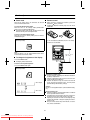
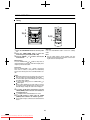
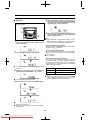
To store a station name again, if the wrong name was
stored in memory by mistake:
When you store station names in memory using the ASPM
function, the correct station names may not actually be
stored if there is lots of noise or if the RDS station signal is
too weak. In this case, store station names in memory using
the following procedure.
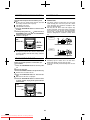
1 Press the STATION button.
2 Within 6 seconds, press the PRESET ( or ) button to
check whether the station names are correct.
3 If you find a station name that is wrong, press the STATION button again within 6 seconds to recall the preset
station, which corresponds to the station name.
4 After the preset station has been received and the correct station name has been displayed, press the MEMORY/SET button.
5 Within 30 seconds, press the MEMORY/SET button
whilst the preset channel number is flashing.
The new station name has been stored in memory correctly.
5
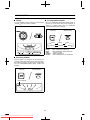
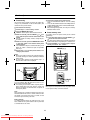
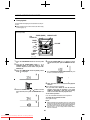
Press the ON/STAND-BY button to turn the power
on.
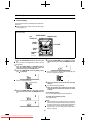
Press the TUNER (BAND) button.
Press the TUNER (BAND) button to select the FM ST
or FM band.
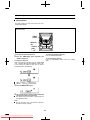
Press the STATION button.
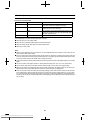
Notes:
When there are no station names stored in memory, you
cannot use this function. In this case, when the STATION
button is pressed, "NOTHING" will flash for 5 seconds,
and the unit will return to the original display.
This function can only be used when the FM band has
been selected.
The same station name can be stored in different preset
channels. Therefore, when you are choosing a station
name from the presets, the same station name may be
encountered more than once.
In a certain area or during certain time periods, the station names selected using the station select function may
temporarily be different from the name of the station you
are actually receiving.
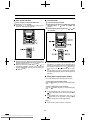
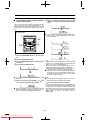
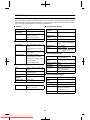
"STATION" and "SELECT" will appear alternately for
about 6 seconds.
Within 6 seconds, press the PRESET (
ton to select a desired station name.
or
) but-
Each time the button is pressed, the station name will
appear. If the button is held down for more than 0.5 seconds, the station name will continuously change.
Whilst the selected station name is flashing (within
6 seconds), press the STATION button again.
After the selected station name has been lit for 1 second,
the preset station which corresponds to the selected station name will be recalled.
21
Downloaded From DvDPlayer-Manual.com Sharp Manuals