1
INST
ALLA
TION
INSTALLA
ALLATION
The installation procedure is divided into three steps:
1. Preparation of the Ericsson W25, where necessary physical
connections are made.
2. Basic configuration, where the mobile network and wireless
LAN connections are configured.
3. Identification of a suitable location and wall mounting the unit.
Be sure to follow these steps as described on the following pages to
successfully install the Ericsson W25.
1 - UNIT PREP
ARA
TION
PREPARA
ARATION
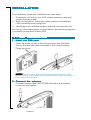
1 . Insert the SIM card
Open the cover on top of the unit and insert the SIM card.
Ensure that the SIM card is inserted in the correct position.
Close the cover.
NOTE! The Ericsson W25 must be disconnected from the
power mains or an optionally installed battery when inserting or
removing the SIM card.
2 . Connect the antenna
Connect the provided UMTS/GSM antenna to the antenna
connector and tighten.
4
Installation