1
MatrixPRO-II DVI 16x16 Router
________________________________________________________________________
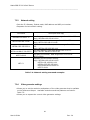
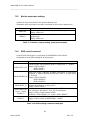
7.2.5
Monitor output port settings
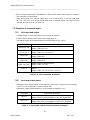
▪ Makes an input connected to the Monitor Output port.
▪ Requests input port that is currently connected to the Monitor Output port.
Command
Description and reply
Makes input 13 connected to monitor output ports.
Reply: MON=13!
Requests current input port that connected to monitor
output port.
Reply: MON=13!
MON=13!
MON=?!
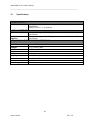
Table 7-7: Monitor output setting command examples
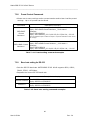
7.2.6
EDID control command
▪ Stores EDID information in input port of MATRIXPRO-II DVI 16x16 .
▪ Requests current EDID setting for all input ports.
Command
Description and reply
EDID=DE1,7,15!
EDID=AUTO2,8,9!
EDID=OUT3_5!
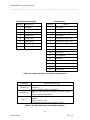
EDID=RES<List
num>_<input
number>!
EDID=?!
Default mode: Saves default EDID in input ports 1, 7 and 15.
Reply: EDID=01DEF.!
EDID=07DEF.!
EDID=15DEF.!
Auto mix mode: Analyzes all EDID information of connected
displays to makes optimized EDID then save it in input ports
2, 8 and 9.
Reply: EDID=02AUTO!
EDID=08AUTO!
EDID=09AUTO!
Output copy mode: Copies EDID information of output 3
display and stores it in input port 5.
Reply: EDID=03OUT.!
Resolution mode: Allows selection of an EDID from list based
on resolution. See table 7-9 for list of resolutions.
Reply: EDID=<input number>RES.!
Example: EDID=RES02_13! Reply: EDID=13RES.!
Requests current EDID setting for all inputs.
Reply: EDID=01OUT.02AUTO03OUT.~16DEF
.!
Table 7-8: EDID setting command examples
38
User’s Guide
Rev. 04