1
SOUND menu options
/
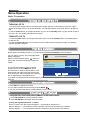
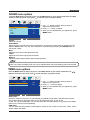
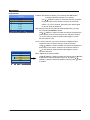
Press the MENU button on the top of your tv or the MENU button on your remote control then use
button to select the sound menu, press
to enter the menu. (see picture below).
SOUND
Volume
20
Sound Mode
Music
Bass
60
Treble
50
Balance
50
Select
1. Use ɼ/ɽ button to select what you want to
adjust in the Sound menu.
2. Press ɺ/ ɻbutton to Adjust.
3. When you are satisfied with your adjustment, press
MENU button.
Adjust
Volume
Adjust the volume.
Sound Mode
Select the type of sound which best corresponds to your listening requirements by selecting Sound
Mode in Sound menu. You may select the picture mode directly by pressing the SOUND button on
the remote control.
Bass
Adjust the level of the lower-pitched sounds.
Treble
Adjust the level of the higher-pitched sounds.
Balance
Adjust the audio output between left and right speakers.
NOTE: The Treble and Bass levels can only be adjusted when the sound setting personal is selected.
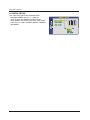
TIMER menu options
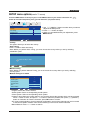
Press the MENU button on the top of your tv or the MENU button on your remote control then use
button to select the Timer menu, press
to enter the menu. (see picture below).
TIMER
Sleep Timer
0 Min
OSD Timer
30Sec
Select
/
1. Use ɼ/ɽ button to select what you want to
adjust in the Timer menu.
2. Press ɺ/ ɻbutton to Adjust.
3. When you are satisfied with your adjustment, press
MENU button.
Adjust
Sleep Timer
Select the sleep time to put the TV automatically into standby mode after a specified period of time.
The period of time for automatic switch off can be selected in steps 15, 30, 45, 60,
75, 90, 105, 120 and 0 Min(Off). You can also select the automatic sleep time by pressing the TIMER
button on the remote control repeatedly.
OSD Timer
You can select the time period for OSD display to remain on the screen such as: 5Sec, 10Sec, 15Sec,
20Sec, 25Sec and 30Sec
12