1
n
n
n
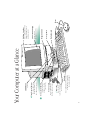
Your Computer at a Glance 18
Taking the Macintosh Basics tour 12
Turning the computer on and off 16
n
The AppleCD 300i drive 31
Setting up your CD-ROM software 33
Using discs in your CD-ROM drive 35
Playing audio compact discs and audio tracks on
CD-ROM discs 38
Working with Photo CD images 41
Troubleshooting for the CD-ROM drive 53
Using the Optional CD-ROM Drive 31
Setting Up 1
Learning the Basics 12
Using Your Macintosh LC 520 20
Plugging in the computer 2
Connecting the mouse and keyboard 3
Turning on your computer for the first time 4
Problems starting up? 6
Safety instructions 6
Health-related information about computer use 7
What’s next? 11
n
Adjusting the sound 20
Using the built-in microphone 22
Adjusting the screen 22
Saving energy 23
Installing an expansion card 25
Using a RAM disk for temporary storage 29
Advice about using a modem with your
Macintosh LC 520 30
Starting up your computer from an external
hard disk 30
Radio and television interference ii
Laser information iii
Contents