1
TABLE OF CONTENTS
CHAPTERS:
1. BEFORE BEGINNING........................................................................1
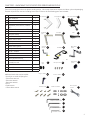
2. UNPACKING THE CYCLEOPS PRO SERIES INDOOR CYCLE............2
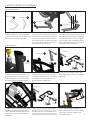
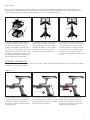
3. INDOOR CYCLE ASSEMBLY...............................................................3
Attach Stabilizer Feet
Attach Handlebar
Attach Seat
Level the Indoor Cycle
Attach Pedals
4. GENERAL USE...................................................................................6
Adjust Seat
Adjust Handlebar
Adjust Resistance
5. COMMON ADJUSTMENTS.................................................................8
Replace Speed Sensor Battery
Replace Cadence Sensor Battery
Replace Hub Batteries
Adjust Flywheel/Chain Tension
Adjust Brake Pad
6. PREVENTATIVE MAINTENANCE.......................................................10
7. ELECTRONICS...................................................................................11
8. RADIO FREQUENCY (RF) INTERFERENCE.......................................12
9. IMPORTANT PRECAUTIONS..............................................................12
10. WARRANTY.......................................................................................13
CHAPTER 1: BEFORE BEGINNING
Congratulations on choosing the CycleOps Phantom Series indoor cycle! The CycleOps Phantom Series indoor cycle takes
cycling to the next level as the only indoor cycle to fit, feel and ride like an outdoor bike.
CycleOps Phantom Series Indoor Cycle User Guide
Read this guide to learn how to:
-Assemble the indoor cycle
-Use the indoor cycle
-Make common adjustments
Visit www.cycleops.com to learn more about Saris Cycling Group and the CycleOps Phantom Series indoor cycle:
-Register product for warranty
-View frequently asked questions
-View instructional videos
-View product and technical updates from CycleOps
-Sign up for CycleOps Power newsletter
-Learn more about training with power
1