1
CONTENT
2.12.2
Photographs on roll film
1. First load a film into the roll film magazine and wind it to the first frame (to this end, please follow the
instructions that come with the Hasselblad roll film magazine). The roll film magazine can be coupled
to, and uncoupled from the Sinar arTec HB-V camera exactly like a digital back with a Hasselblad-V interface (please also see chapter 2.4).
2. With the Sinar arTec camera in the Viewing position, you can now compose your picture on the focusing screen.
3. When you have finished composing the image, shift the Sinar arTec to the Exposure position.
4. Remove the Cover slide from the film magazine so that the film can be exposed.
5. Make the exposure by activating the Cable release attached to the lens' shutter.
6. Now you can advance the film to the next frame (please see chapter 2.12.3) or put the Cover slide
back into the roll film magazine so that you can remove it from the camera (see chapter 2.4).
Please note that the double-exposure prevention feature does not work when a Hasselblad V Roll
Film Magazine is used on a Sinar arTec camera.
Please make sure that the Cover slide is inserted into the roll film magazine properly before removing the magazine from the Sinar arTec camera.
2.12.3
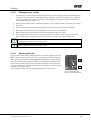
Advancing the film
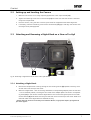
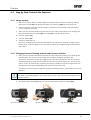
The Sinar arTec HB-V camera is equipped with a mechanism to advance the film
[54]. In order to advance the film to the next frame after an exposure has been
made, press the Film advance button [55] upwards repeatedly, always letting it
return to the rest position between strokes, until the exposure-ready signal window (on the right side of the exposure counter window) on the roll film magazine shows white again. To make this procedure a little easier, shift the Focusing
magnifier a bit out of the way.
The film advance slider has to be shifted approximately 12 to 14 times.
54
55
Fig. 22: Advancing the
film on a Sinar arTec HB-V
Sinar arTec Operating Instruction V 1.00
16