1
5.6.7 No Print or Light Print
If there is no printhead noise when the carriage traverses a document:
1. Check that the printhead is plugged into the carriage flex cables.
2. Check that the flex cables are plugged into the main PCB J3 and J4.
3. Replace timer U13 or MOSFET Q7 on the main PCB.
4. Repair or replace the main PCB with a bad driver circuit.
If there is printhead noise but there is no print or light print:
1. Correctly install the ribbon cartridge (see 3.1) or replace it if worn out.
2. Remove the cartridge and check for jammed ribbon.
3. Check that the cartridge knob rotates as the carriage traverses.
4. Check that QUIET MODE is turned off under 92 FUNCT.
5. Check the NORMAL and CQ DARKNESS parameters (see 3.5.4)
7. Check the printhead gap at both ends of the platen(see 5.4.1).
8. Clean the printhead (see 5.1.4).
9. Check that the carriage flange that clamps the drive belt is not bent down.
10. Check that the ribbon shield is pushed up until it clicks into place
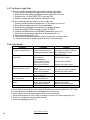
5.6.8 Print Quality
Symptom
Condition
Print not dark enough on
receipts or multipart forms.
Ribbon needs replacement
Ribbon installed incorrectly
Increase print darkness setting
Streaking or smearing over
printed lines.
Ribbon installed incorrectly
Ribbon shield is
missing/damaged
Ribbon is near end of life.
Ribbon has too much ink.
Generic ribbon installed
Ribbon fabric is folded or
twisted.
Ribbon installed incorrectly
Generic ribbon installed
Printhead or printing circuit is
defective (unusual).
Racked carriage shaft or
misadjusted shaft cam
Ribbon installed incorrectly
Ribbon shield is damaged
Generic ribbon installed
Ribbon shield is damaged
Large gaps in printing or
sporadic light print occurs.
A row of dots is missing
Print is darker on one side
than on the other
Ribbon getting tangled in
printer
Documents being torn
Remedy
Replace ribbon cartridge.
See page 5 for ribbon installation
See “DARKNESS” service
parameters 3.5.4
See page 3 for ribbon installation
Replace ribbon shield.
Replace ribbon cartridge.
Replace with Craden ribbon
Replace ribbon cartridge.
See page 3 for ribbon installation
Replace with Craden ribbon
If unusable, initiate a service call
If unusable, initiate a service call
See page 3 for ribbon installation
Replace ribbon shield
Replace with Craden ribbon
Replace ribbon shield
If print is light all across the print line, check as if printhead noise were present in 5.6.7. Print
on a thick document will always be a little lighter than on a thin one.
If there is ribbon smear on the document and it is not very wrinkled:
1. Check that document is not too thick or printing is too close to a fold or edge (see 1.2)
2. Check for a displaced or missing ribbon shield.
3. Check printhead gap (see 5.4.1).
Back to Table of Contents
40