1
DigiPoS Retail Blade ™ Manual
IDE Options Sub Menus
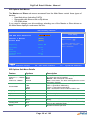
The Master and Slave sub-menus accessed from the Main Menu control these types of
devices:
o Hard disk drives (including S-ATA)
o Removable-disk drives such as Zip drives
o CD-ROM drives
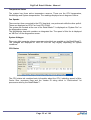
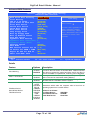
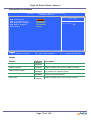
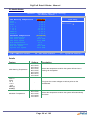
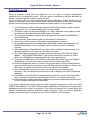
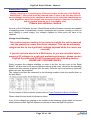
If you need to change your drive settings, selecting one of the Master or Slave drives on
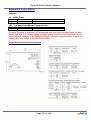
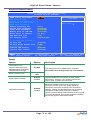
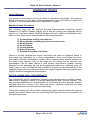
the Main Menu displays a sub-menu like this:
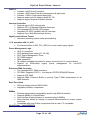
Phoenix – AwardBIOS CMOS Setup Utility
IDE Primary Master
Item Help
IDE HDD Auto-Detection
[Press Enter]
Channel 0 Master
Access Mode
[Auto]
[Auto]
Menu Level ff
Capacity
20021 MB
Cylinder
Head
Precomp
Landing Zone
Sector
38792
16
0
38791
63
To auto-detect the
HDD’s size, head…. On
this channel
ÇÈÆÅ: Move Enter:Select
F5 : Previous Values
+/-/PU/PD:Value
F10:Save
F6: Fail-Safe Defaults
ESC:Exit
F1:General Help
F7 : Optimised Defaults
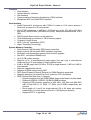
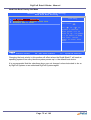
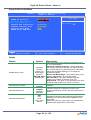
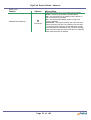
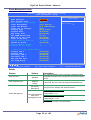
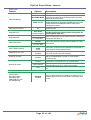
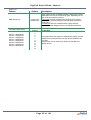
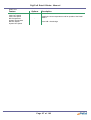
IDE Options Sub Menu Details
Feature
Options
Channel 0, 1, Master/
Slave/
Channel 2, 3 Master
None
Auto
Manual
Description
Capacity
CHS
LBA
Large
Auto
N/A
None = Either NO drive is installed or you can disable
any drive that may be installed.
Manual = Non-Functional in this BIOS.
Auto = Auto detect. The drive itself supplies the correct
information (Default)
CHS = Cylinder, Head, Sector
LBA = Logical Block Addressing
Large = Large Disk Access Mode
Auto = Auto Detect correct mode for HDD in use.
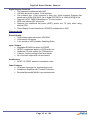
HDD size in Mb
Cylinder
1 to 65,536
Number of cylinders.
Head
1 to 16
Number of read/write heads.
Precomp
1 to 2048
None
Landing Zone
N/A
Sector
N/A
Number of the cylinder at which to change the write
timing.
2048 Number of the cylinder specified as the landing
zone for the read/write heads
Number of Sectors per track
Access Mode
Page 69 of 103