1
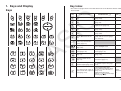
1. Keys and Display
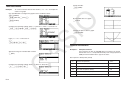
Key Index
Keys
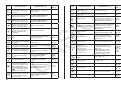
• The reference pages shown in the table below are for the Software Version 2.00
User’s Guide.
Key
Combined with Selects 1st function menu
item.
Performs trace operation
(page 5-29).
AS
IO
Trace
Primary Function
Selects 2nd function menu
item.
Performs zoom operation
(page 5-5).
Selects 3rd function menu
item.
Displays V-Window parameter
input screen (page 5-3).
Selects 4th function menu
item.
Performs sketch operation
(page 5-28).
Selects 5th function menu
item.
Performs G-Solve operation
(page 5-30).
Selects 6th function menu
item.
Switches display between
graph and text screens (pages
5-1 and 5-24).
Activates shift functions
of other keys and function
menus (page 1-2).
Zoom
V-Window
Sketch
G-Solv
GjT
*
PRGM
)
SET UP
K
-LOCK
C
?
r
7
x
Q
,
Combined
with ?
Displays option menu
(page 1-22).
Turns backlight on/off.
Displays the variable data
menu (page 1-23).
Displays program command
menu (page 1-25).
Returns to the Main Menu
(page 1-2).
Shows the Setup screen
(page 1-26).
Allows entry of alphanumeric
characters shown in red
(page 1-2).
Locks entry of alphanumeric
characters (page 2-7).
Press after entering value to
calculate square (page 2-14).
Press before entering value
to calculate square root (page
2-14).
Enters
character
r.
Press between two values to
make second value exponent
of first (page 2-14).
Linear input/output mode:
Press between entering values
for X & Y to show xth root of y
(page 2-14).
Math input/output mode:
) in natural input
Enters x(
format (page 1-18).
Enters
character
Ƨ.
E-1