1
Chapter 5 - Speed Control
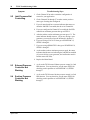
Symptom
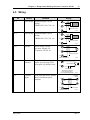
5.10 Turbine Will Not
Go Above Idle
Speed
19
Troubleshooting Steps
1. Check Channel 82 to determine how the TS310 has been
configured to operate the idle speed and acceleration.
2. If the configuration is set for no idle then go to STEP 6.
3. If the configuration is set for auto acceleration by pressing F2
then go to SYMPTOM 3.10, STEP 1 through 8.
4. If the configuration is set for manual acceleration then go to
STEP 6.
5. If the configuration is set for fast start then go to STEP 6.
6. Press stop and check the governor valve to see that it can
stop the turbine.
7. Check the calibration of the governor valve versus the V1
current output.
8. Check Channels 39. Make certain you are not imposing a
valve limit on the output.
9. Change the Main Board.
April 1998
Rev. 1