1
Section 5: Backing Up Projector Settings
5.
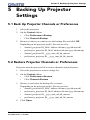
When restoring channel definitions, PowerTool prompts you to delete
existing channels first:
•
Click Yes to clear existing channels. Only the channels in the
restore file will remain after the restore operation.
•
Click No to keep existing channels. Only the channels that in the
restore file are updated. Other channels remain unchanged.
NOTE: If no projectors are found, your router and/or firewall may not be
configured correctly. If some projectors are found and others are not, you
may have problems with one or more of the following: duplicate IDs or IP
addresses, incorrect IP addresses, or incorrect firewall configuration.
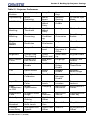
5.3 Projector Preferences
Table 5.1 Projector Preferences
Shutter
3D Stereo
Select Sync
Test
Pattern
Grey
Focus
Language
Picture Mute
3D Stereo Sync
Delay
Freeze
Image
Internal Test
Pattern
Screen
Orientation
Onscreen
Display
Frame Delay
Level
Detector
Select
Source
Broadcast Keys
Picture-inPicture
Brightness
Uniformity
Color
Enable
Select Input
Projector
Number
Active
Projector
Edge Blending
Lamp
Message
Enable
Source/
Channel
Name
Password
Enable
Auto Setup
Edge Blend
Select
Lamp Limit
In Menu
Fan Sensor
Enable
Size-Position
Presets
Select Output
Color
Lamp
Mode
Source
Memory
Lock
PIP Border
Width
Size
Warp Select
Lamp
Power
Auto Source
Br. Uniformity
Select
Vertical
Stretch
2D Keystone
Corners
Lamp
Intensity
Delete
Source
PIP Horizontal
Position
Pixel
Tracking
Warp Prefilter H
Lamp
Changed
Baud Rate
PIP Vertical
Position
Pixel Phase
Warp Prefilter V
Optical
Aperture
Baud Rate
Secondary
PIP Horizontal
State
Horizontal
Position
Warp Sharpness
LampLOC
Module
Projector
Number
Blue Odd Gain
5-2
PowerTool 2.0 User Manual
020-100035-02 Rev. 1 (03-2010)