1
3.
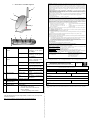
Highlight Internet Protocol (TCP/IP) and click on Properties
button.
4.
Select the radio buttons for Obtain an IP address
automatically and Obtain DNS server address
automatically. Click OK button to update the changes.
6.
Go to Wireless Networks tab and click on Add.. button.
7.
Next, enter the Network name (SSID) which must be the same
as the ESSID that you input earlier for your access point.
Next, you may set up Windows XP’s Wireless Network Connection
as follows:
Ensure that the Network name (SSID) value is the same for all
wireless clients in the same wireless network.
5.
For now, you may leave the other information as its default settings.
Network Authentication: Open
Data encryption: Disabled
Right click on Wireless
Network
Connection
corresponding to the Wireless
Ethernet Adapter you wish to
connect to your Compex
WPE54AG, and click on
Properties.
For details in configuring your Compex WPE54AG, kindly refer to
the User’s Manual stored in the Product CD.