1
Maintenance
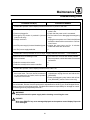
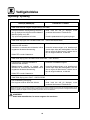
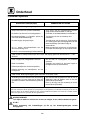
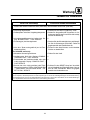
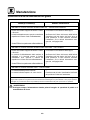
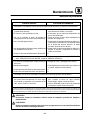
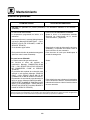
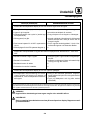
Troubleshooting Guide
POSSIBLE CAUSE(S)
SUGGESTED REMEDY
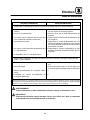
SYMPTOM: Operator control display is blank and there is no power to the oven.
S Power outlet is not live (new installations).
S Have a qualified person ensure that the power
S Oven not plugged in.
S
S Emergency stop button is pushed in (remote S
control oven only).
S Fuse(s) are blown.
S
S 24 VDC power supply’s internal breaker tripped. S
S 24 VDC power supply defective.
S
outlet is live.
Check that the power cord is connected.
Pull the button out to disengage the emergency
stop.
Unpug the oven power cord. Check the 5A fuses
behind the electrical box access door. Call service if blown.
Unplug the oven power cord for 15 minutes.
Check the fuses then reconnect.
*
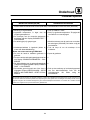
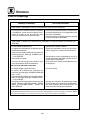
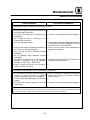
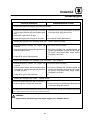
SYMPTOM: Conveyor belt will not run or stops. Display reads MOTOR FAULT --- CALL SERVICE.
S Belt hooked on something in oven.
S Belt overloaded.
S Turn oven OFF. Unhook and resolve problem.
S Remove product until the belt starts to move and
S Defective conveyor drive motor.
S Defective conveyor drive motor controller.
S *
S *
call service.
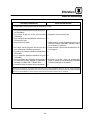
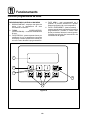
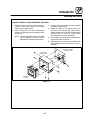
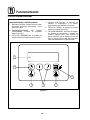
SYMPTOM: Operator control display is blank and the oven is on.
S Connection at the rear of the operator control S Shut off manual gas valve. Once the oven has
has come loose. The oven should continue to
cooled down unplug the oven and call service.
run and respond to any faults, but the operator
(SG2136G).
control will not function.
S Press the emergency stop button and call service (SG2136E). (remote control oven only)
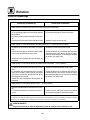
*Denotes remedy is a difficult operation and should be performed by qualified personnel only. It is
recommended, however, that All repairs and/or adjustments be done by your local Blodgett service
agency and not by the owner/operator. Blodgett cannot assume responsibility for damage as a result
of servicing done by unqualified personnel.
WARNING!!
Always disconnect the power supply before cleaning or servicing the oven.
PLEASE!!
Write down EXACTLY any error message displayed on the operator control display. Report all
error messages.
31