1
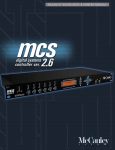
M20.06 Controller
user manual
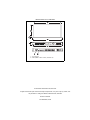
Measurements are in millimeters
433
200
3
480
44
A
B
1
2
3
4
5
M20.06 System Processor
6
462
1
2
1 - AC power in
2 - Fuse (0mm x 5mm 'T' fuse, rated at 1A)
© 2001 Martin Professional A/S, Denmark.
All rights reserved. No part of this manual may be reproduced, in any form or by any means, without permission in writing from Martin Professional A/S, Denmark.
Printed in Denmark.
P/N 35020002, Rev B
Introduction..................................................................................... 5
Safety information ............................................................................................................. 5
Compliance .................................................................................................................. 6
Quick start ...................................................................................... 7
1 - Connect AC power.................................................................................................. 7
2 - Attach audio connections........................................................................................ 7
3 - Access pre-loaded program settings ...................................................................... 7
Installation ...................................................................................... 9
Power................................................................................................................................ 9
Voltage setting ............................................................................................................. 9
AC power fusing........................................................................................................... 9
Mains power connection ............................................................................................ 10
Mechanical installation.................................................................................................... 10
Controls ........................................................................................ 11
Input section ................................................................................................................... 11
Store/Recall keys ....................................................................................................... 11
RIGHT/LEFT keys...................................................................................................... 11
RIGHT/LEFT/UP/DOWN access keys ....................................................................... 11
Main display ............................................................................................................... 11
Input meter ................................................................................................................. 11
Output section................................................................................................................. 12
Mute LED ................................................................................................................... 12
Mute key..................................................................................................................... 12
Output meter .............................................................................................................. 12
Rear panel ...................................................................................................................... 12
Mains power input ...................................................................................................... 12
RS-232 connector ...................................................................................................... 12
6 band outputs ........................................................................................................... 12
2 channel inputs ......................................................................................................... 13
Operation...................................................................................... 14
Moving about the screens............................................................................................... 14
Utilities menu .................................................................................................................. 14
Stereo link .................................................................................................................. 15
Delay units ................................................................................................................. 15
Lock out...................................................................................................................... 15
MIDI channel .............................................................................................................. 15
Contrast...................................................................................................................... 15
MIDI dump.................................................................................................................. 15
Delete program .......................................................................................................... 16
Inputs menu .................................................................................................................... 17
Delay .......................................................................................................................... 17
EQ .............................................................................................................................. 17
Outputs menu ................................................................................................................. 17
Name.......................................................................................................................... 17
3
Source ........................................................................................................................18
Band gain ...................................................................................................................18
Limiter threshold .........................................................................................................18
Delay ..........................................................................................................................18
Delay link ....................................................................................................................18
Polarity .......................................................................................................................19
Low Xover ..................................................................................................................19
High shape .................................................................................................................19
High Xover..................................................................................................................19
EQ ..............................................................................................................................20
EQ screens ..................................................................................................................... 20
Adding a new EQ .......................................................................................................20
EQ shape ...................................................................................................................20
Frequency ..................................................................................................................20
Cut/Boost....................................................................................................................20
Width (BELL only) ......................................................................................................21
Store and recall ............................................................................................................... 21
Storing ........................................................................................................................21
Recalling.....................................................................................................................22
System Security ........................................................................... 23
Program lock ................................................................................................................... 23
Lock mode....................................................................................................................... 23
Specifications............................................................................... 24
4
1
INTRODUCTION
Thank you for selecting the Mar tin M20.06 Controller. The M20.06
Controller is a one unit loudspeaker management system, capable of
operating all speakers in the Mach product range. This digital circuitry is
based on BSS OMNIDRIVE™ DSP technology and comes equipped with
24-bit A-D and D-A converters. Fast and easy set-up of Mach speaker
systems is ensured by 50 pre-set programs with settings for all Mach
speaker models. Each preset offers carefully optimized crossover points and
slopes, polarity, delay and EQ settings to exactly fit the individual
characteristics of each Mach loudspeaker.
SAFETY INFORMATION
Read this manual before powering or installing the fixture, follow the safety
precautions listed below and observe all warnings in this manual and on the
fixture. If you have questions about how to operate the fixture safely, please
contact your Mach dealer.
This product is not for household use.
Do not removed the covers. There are no user-serviceable parts inside.
Refer all servicing to qualified service personnel.
This equipment must be earthed.
Use only a source of AC power that complies with local building and
electrical codes and has both overload and ground-fault protection.
Do not removed any of the protective ear th, or signal cable shield,
connections. Such action is against recommended practise and will render
any EMC or safety certification void.
Introduction
5
Compliance
The M20.06 has been tested and found to comply with the following
European and international Standards for Electromagnetic Compatibility
and Electrical Safety:
Radiated
Emissions (EU)
EN55013
RF Immunity (EU) EN50082/1
(1990)Associated Equipment
(1992)RF Immunity, Fast
Transients ESD
Mains
Disturbance (EU)
EN61000/3/2
(1995)
Electrical Safety
(EU)
EN60065
(1993)
Radiated
Emissions (USA)
FCC part 15
Class B
Electrical Safety
(USA)
UL813/ETL
(1996)Commercial Audio
Equipment
Electrical Safety
(CAN)
UL813/ETLc
(1996)Commercial Audio
Equipment
For continued compliance with international EMC legislation ensure that all
input and output cables are wired with the cable screen connected to Pin 1
of the XLR connectors. The input XLR Pin 1 is connected to the chassis via
a low value capacitor, providing high immunity from ground loops whilst
ensuring good EMC performance.
6
Introduction
2
QUICK START
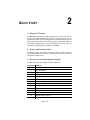
1 - Connect AC po wer
The M20.06 has a universal voltage AC Power input. Connect the unit to AC
Power with the lead supplied. It will switch on automatically (there is no
separate on/off switch). The display will show the default screen, with the
name and program number of the current program. (This will be either the
last program recalled before the unit was switched off, or, in the case of a
unit with no stored programs, the default: 1 UNUSED)
2 - Attach audio connections
Connect the inputs and outputs as required. All inputs and outputs are
electronically balanced, with Pin 2 hot signal (+ve). Do not put any audio
through the unit at this time.
3 - Access pre-loaded prog ram setting s
The pre-loaded programs supplied in version 230701 are:
Program #: Supports
1
M12T and M182T
2
M15T and M182T
3
M30T and M182T
4
M154i and M182T or i
5
M129i and M182T or i
6
M156i and M182T or i
7
M12T full range ch 2+3+5+6
8
M15T full range ch 2+3+5+6
9
Slingshot 3 Way passive XO stereo. MS1262, MS118
10
Slingshot 4 Way mono. MS1262, MS118
11
Slingshot 5 Way mono. MS1262, MS15X2, M182T or MS118.
12
Slingshot 5Way mono. MS1262, MS15X2, Ballister SUB
13
M1502T active x 3 input A.
14
M1201T active x 3 input A.
Quick start
7
Program #: Supports
15
M127i Passive and M152i. In A: 1+2. In B 3+4. In A+B 5+6
16
M154i Passive and M182i. In A: 1+2. In B 3+4. In A+B 5+6
17
M129i Passive and M182i. In A: 1+2. In B 3+4. In A+B 5+6
18
M156i Passive and M182i. In A: 1+2. In B 3+4
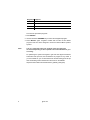
To access the pre-loaded programs:
1 Press RECALL.
2 Use the Parameter UP/DOWN keys to select the designated program.
3 Press RECALL again. Programs marked with the letter M are Master
programs and have been designed to match the different Mach speaker
systems.
Note:
It is very important that your settings have the right gain
structure depending on the amplifier size and manufacturer you
are using.
For optimizing the system with regard to gain and time alignment between
subwoofers and top boxes, the SIA Smaart Live program is very useful. If
you use SmaartLive, you can download some Smaart starting point set-ups
from the following Internet address and save them on the M20.06:
http://www.mach.dk/accessories/SmaartLive_M20.06_settings.zip
8
Quick start
3
INSTALLATION
This section describes how to mount the M20.06 Controller and how to
connect it to AC power.
POWER
Voltage setting
The M20.06 uses a switched-mode power supply which offers high
efficiency and low heat generation. This power supply accepts universal AC
Power input voltages in the range 100V AC to 240V AC (nominal), and
requires no setting adjustment for AC power voltages in this range. Minimum
AC input voltage is 90 Volts, and the maximum is 264 volts. Outside these
ranges the unit will not work satisfactorily, if at all. Voltages in excess of the
maximum will probably cause damage. Voltages below the minimum will
cause complete system shutdown. The flash memory in the M20.06 will
preserve all data in the event of a power failure.
AC power f using
The green-and-yellow wire of the mains cord must always be connected to
an installation safety earth or ground. The earth is essential for personal
safety as well as the correct operation of the system, and is internally
connected to all exposed metal surfaces. Any rack framework into which this
unit may be mounted is assumed to be connected to the same grounding
circuit.
The incoming mains power is fused within the M20.06 by the fuse holder
mounted on the rear panel. Always replace with an identical 20mm x 5mm
'T' fuse, rated at 1A for continued protection from equipment damage and
fire.
It is for safety reasons that this specification is strictly adhered to.
Installation
9
Mains power connection
WARNING: The appliance must be earthed.
The wires in the mains lead are color coded in accordance with the following
code. The wire which is coloured:
• Green and yellow, or green, must be connected to the terminal which is marked with
the letter 'E' or by the earth signal or which is coloured green and yellow or green.
• Blue must be connected to the terminal labelled 'N' or coloured black or blue.
• Brown must be connected to the terminal labelled 'L' or coloured red or brown.
MECHANICAL INSTALLATION
A vertical rack space of 1U (1¾" / 44.5 mm high) is required. Ventilation
gaps are unnecessary.
If the M20.06 is likely to undergo extreme vibration through extensive road
trucking and touring, it is advisable to support the unit at the rear and/or
sides to lessen the stress on the front mounting flange. The necessary
support can generally be bought ready-built as a rack tray. As with any lowlevel signal processing electronics, it is best to avoid mounting the unit next
to a strong source of magnetic radiation, for example, a high power
amplifier, to help keep residual noise levels in the system to a minimum.
10
Installation
4
CONTROLS
This section describes the physical interfaces to the M20.06 Controller.
INPUT SECTION
Store/Recall keys
Program data can be stored to one of 60 internal memory locations using
the Store facility. The STORE key also doubles as an ENTER key for
confirmation of some actions.
Program data is recalled to the unit from internal memory using the Recall
facility.
RIG HT/ LE F T keys
Controller keys for editing parameters displayed on the LCD screen.
RIGHT/ LE FT/UP/DOWN access keys
Controller keys for moving between screens to access different parameters
to edit.
Mai n di s pl ay
The main LCD screen displays current parameters being edited.
Input meter
Input signal level referenced to the clip level. Actual signal clipping will occur
slightly above the 'clip' indicator.
Controls
11
OUTPUT SECTION
Mute LED
Shows the mute status of the output band.
Mute key
Pressing a mute key will toggle the associated band output on and off. The
mute LED is illuminated when the output is MUTED. Mute status is saved
when a program is stored.
Output meter
Shows the output of each channel relative to the limiter threshold.
REAR PANEL
Mains pow er input
The Power inlet for the M20.06. Note that there is no On/Off switch for the
unit.
RS-232 connector
For connection to a PC for access to one or more units on a MIDI loop,
which provides an easy way to upload new software.
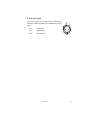
6 band outputs
The audio outputs are electronically balanced and floating.
Transformer balancing is available as a retrofit option.
12
Pin 1
Shield/Ground
Pin 2
Signal Hot (+)
Pin 3
Signal Cold (-)
Controls
2
1
3
2 channel inpu ts
The audio inputs on the M20.06 are electronically
balanced. Transformer balancing is available as a retrofit
option.
Pin 1
Open circuit
Pin 2
Signal Hot (+)
Pin 3
Signal Cold (-)
Controls
2
1
3
13
5
O PERATION
The chapter describes:
•
•
•
•
•
•
“Moving about the screens”
“Utilities menu”
“Inputs menu” on page 17
“Outputs menu” on page 17
“EQ screens” on page 20
“Store and recall” on page 21
After powering up, the unit performs internal checks and sets up the audio
path before releasing the output mute relays. This takes a few seconds.
When the unit is powered up the Default Screen is shown. This shows the
current program name and number.
MOVING ABOUT THE SCREENS
Use the:
• UP/DOWN access keys to move between Default, Utility, Input and Output menus
(Horizontal columns).
• RIGHT and LEFT keys to move along each menu.
• Parameter UP/DOWN keys to adjust a parameter. (When adjusting a value,
pressing a key once will usually give a small increment/decrement whilst holding a
key down will give a larger increment/decrement).
Moving to a new menu may not bring up the first screen shown in each row,
as the unit remembers, and moves you to, the last screen accessed in each
menu.
Store and Recall are accessed by pressing their respective keys.
UTILITIES MENU
Pushing the RIGHT key while viewing the default screen will move you into
the Utilities menu. The RIGHT and LEFT keys are used to move along the
14
Operation
Utilities path, and the Parameter UP/DOWN keys are used to change the
selected parameter.
Stereo link
This mode selects whether parameters will be adjusted together or
independently on each channel. The stereo link pairs in:
• 2-channel 3-way are 1 & 2, 3 & 4 and 5 & 6.
• 3-channel 2-way are 1 & 3, and 4 & 6.
Pushing the Parameter UP/DOWN keys selects Stereo Link: ON or OFF.
Delay units
This selects the units used for displaying and adjusting delays. 'ms'
represents milliseconds, 'ft' represents feet (and feet and inches for short
delays), and 'm' represents metres.
Lo ck ou t
The Lock Out mode prevents access to editing functions on the input and
output channels. Since this utility is not password-protected, Lock Out can
still be accessed and turned off. This mode is intended only as a precaution
against accidental adjustments, and not as a tamper-proof security lock.
MIDI channel
Here, you can select the MIDI channel that the unit is assigned to (Channels
1 through 16 are available).
Contrast
This allows you to change the contrast of the LCD display.
MIDI dump
This utility allows you to dump the current program settings to another unit,
or a MIDI storage device for backup, or for the purpose of synchronizing a
pair of units for stereo operation. Performing a MIDI dump will completely
overwrite all programs in the receiving device (Rx), including the current
program, with those from the sending device (Tx). If you are using the MIDI
Dump to transfer data to another unit via MIDI ensure that both devices are
set to the same MIDI channel, and connect either the MIDI OUT of the Tx
device to the MIDI IN of the Rx device. Alternatively, the M20.06 can be
linked via their RS232 ports.
Operation
15
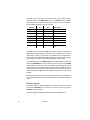
Each unit must be set to the correct MIDI mode, from a choice of Multi,
Master or PCPort on the MIDI mode screen in the Utilities menu. The MIDI
mode setting for each device will depend on the protocol used and whether
synchronization between the units is required.
Protocol
Tx
Rx
RS232
PCPort
Multi
Sync. Status
-
RS232
PCPort
PCPort
-
RS232
Multi
Multi
-
RS232
Multi
PCPort
RS232
Master
Multi
Synchronized
RS232
Master
PCPort
Synchronized
MIDI
Multi
Master
-
MIDI
Master
Master
Synchronized after
dump.
-
Note that all units connected via MIDI port will only be synchronized after a
MIDI dump has been performed. Units connected via RS232 do not require
a MIDI dump in order to synchronize, but if a MIDI dump is not performed,
each unit will contain different stored programs and current program settings
until changes are made to each setting individually on the Tx unit).
The default position for the MIDI dump screen is MIDI DUMP: NO. Use the
Parameter UP/DOWN keys to select YES on the Tx unit, then press STORE
at the prompt, to confirm the dump. A percentage complete figure on the Tx
screen will show how much data has been transferred. The Rx screen will
read Warning! Incoming Dump. When the dump is complete, the Tx screen
will default to NO. The Rx screen will display the name of the new current
program.
Notes that all parameter edits in all stored programs will be overwritten in
any CUSTOMER UNIT set to the same MIDI channel. Use MIDI Dump with
care!)
Del et e pr og ram
This facility allows any stored program to be removed from the unit. Use the
Parameter UP/DOWN keys to select the desired program, and press
STORE to confirm deletion.
Note that programs marked M cannot be deleted from USER units.
16
Operation
INPUTS MENU
There are two inputs available for routing to outputs plus an internal mono
sum of inputs A and B, referred to as A+B. This gives the Input Channels: A,
B, and A+B.
The facilities described in this section are common to all inputs, except EQ,
which is not possible on the mono sum A+B signal.
Delay
The first screen in the input menu is the Delay screen. Pressing the RIGHT
key will access the EQ screens.
The delay on each input channel can be adjusted individually, in 22
microsecond steps by pushing the Parameter UP/DOWN keys. (Holding a
Parameter UP/DOWN key down will increment/decrement the amount of
delay in larger steps). This delay is typically used to set the delay for delay
towers etc., or to stagger the delays between the left and right channels to
'move' sound lobes in an installation.
Delays can be viewed and adjusted in metres (default), feet/inches, or
milliseconds.
Note that the maximum delay value is restricted by any delay on an output
that is fed by the current input.
Input delay and output delay for any signal path is limited to 630ms.
EQ
To add EQ to an input, step through the functions on the desired channel
using the RIGHT/LEFT keys until you reach the screen that shows the EQ
parameter you wish to edit. (See “EQ screens” on page 20 for more details).
OUTPUTS MENU
To select any of the output bands, press the UP/DOWN keys until the output
is shown on the screen.
Name
The first screen in the Output menu is the Name function. Here you can
identify each output with a name suitable to its function, selecting from a list
of names in the unit, such as SUB, or 2" HORN. Use the Parameter
UP/DOWN keys to select the desired name. If the name selected while
Operation
17
stereo is NOT linked begins with L<space> or R<space>, then the L or R will
not be displayed when stereo linking is on.
Source
To change the source input, use the Parameter UP/DOWN keys until the
desired input source is selected.
Ban d gai n
Adjusts the output gain from -25dB to +4dB using the Parameter UP/DOWN
keys.
Limi ter threshold
The band limiter threshold can be adjusted between -20 to +10dBu in 0.2
dBu steps by pushing the Parameter UP/DOWN keys to set the desired
value to match the sensitivity of the amplifier in use. Setting the limiter
thresholds below the amplifier clipping sensitivity by about 2dB is
recommended. This prevents any transient overshoot driving the amplifier
into clip and so damaging your loudspeakers. Threshold setting also
determines the output meter sensitivity.
Del ay
The output delays are most often used to electronically align the driver voice
coils with the other drivers in the system, so the sound sources are coherent
to the listener.
Each increment is only 22 microseconds, which translates in physical terms
to a distance of 6.8mm
Del ay link
The Delay Link option allows you to control several band delays with a
single adjustment. This means that once all the drivers in a single cabinet
have been aligned, the whole cabinet can be delayed relative to the input
signal, or another cabinet, by linking these band delays as one. Any offsets
applied before linking will be retained after linking. In the Delay Link screen,
Use the Parameter UP/DOWN keys until the desired linking configuration is
shown. In:
• Mono configuration, 1 will link to 2, 2 will link to 3 etc.
• 2-channel 3-way configuration, 1 will link to 3, 3 will link to 5, 2 will link to 4
and 4 will link to 6.
18
Operation
• 3-channel 2-way configuration, 1 will link to 4, 2 will link to 5 and 3 will link to
6.
Po larit y
The polarity invert function allows the phase of an output to be rotated by
180 degrees. Default is un-inverted. Pushing the Parameter UP key will
invert the polarity of the output. Pushing the Parameter DOWN key will
return the polarity of the output to un-inverted.
This screen is used to select the filter type/shape for the lower band edge
(high-pass) of the current output band. The band edge will be highlighted on
the graphic on the screen.
The available filter types are as follows, in this order:
•
•
•
•
•
•
•
Butterworth 12dB /Octave
Linkwitz-Riley 12dB Octave
Butterworth 18dB / Octave
Butterworth 24dB / Octave
Linkwitz-Riley 24dB / Octave
Butterworth 48dB / Octave
Linkwitz-Riley 48dB / Octave
Pushing the Parameter UP/DOWN keys will scroll through the above list.
Lo w X o ver
The lower edge (high-pass) of the crossover band can be set over a wide
frequency range from OUT (no roll off) through 15Hz to 16kHz. Pushing the
Parameter UP key will increase the frequency, with OUT as the final step.
Pushing the Parameter DOWN key will increase the frequency, to the final
clockwise position OFF, which mutes the output.
High shape
Selects the Edge filter type and slope as for the higher (low-pass) band
edge.
High Xo ver
This function works in a similar way to the Low Xover, except that OUT is the
last step at the clockwise position.
Pushing the Parameter UP/DOWN keys will decrease the frequency, to the
final clockwise position OUT, which DOES NOT mute the output.
Operation
19
EQ
To add EQ to an input, step through the functions on the desired channel
using the RIGHT/LEFT keys until you reach the screen that shows the EQ
parameter you wish to edit. (See “EQ screens” on page 20 for more details).
EQ SCREENS
If the M20.06 is configured for MONO, all EQs will be mono. If configured for
2x2+1 ("stereo"), EQs will be marked as Stereo 'S' when STEREO LINK is
ON, and the stereo marker will show an 'S' next to the EQ number. Available
spare EQ filters are also shown.
Adding a new EQ
If you press the RIGHT key and the screen does not change, then you have
reached the last EQ currently in use. To add an EQ, the cut/boost of the
highest EQ must be edited. Another EQ (assuming there are spare EQs) will
then be inserted automatically.
NOTE: The A+B signal is summed after the EQ sections on A and B, so the
A+B signal is affected by A and B EQ.
EQ shape
The shape of the EQ can be selected from one of the following by pushing
the Parameter UP/DOWN keys:
•
•
•
•
•
Hi shelving with 6dB slope (Hi6)
Hi shelving with 12dB slope (Hi12)
BELL
Low shelving with 6dB slope (Lo6)
Low shelving with 12dB slope (Lo12).
Frequency
Pushing the Parameter UP/DOWN keys adjusts the EQ frequency. The filter
position is shown graphically by the cursor, and the Frequency of EQs can
range between 15Hz and 16kHz.
Cut/ Boost
Pushing the Parameter UP key to add boost (+ gain) or DOWN for cut (gain). Cut/boost is available between +15dB and -15dB, in 0.2dB
increments.
20
Operation
Wi dt h (BE LL o nl y)
Pushing the Parameter UP key widens the EQ (lower Q), pushing the
DOWN key makes the EQ narrower (higher Q). EQ Width is available
between 0.05 and 3 Octaves, in 0.05 increments.
STORE AND RECALL
Storing and Recalling a program can be done at any time using the STORE
and RECALL keys on the left hand side of the LCD. The M20.06 can hold
60 programs inter nally. To reset a unit to default values, use the
configuration parameter in the Utilities screen.
If the unit is prompting for confirmation of an action at any time, the STORE
key is used to conform the action, and pressing it at this point will not access
the STORE facility.
Sto rin g
Pressing the STORE key will access the Store screen.
Use the RIGHT/LEFT keys (or push the Parameter UP/DOWN keys) to
move along the program name.
While the Program number is highlighted, pushing the Parameter
UP/DOWN keys will cycle through programs 1-60.
Whilst each of the letters in the Program name are highlighted, pushing the
Parameter UP/DOWN keys will cycle through all available characters.
The last space in the program name is reserved for Program lock. Pushing
the Parameter UP/DOWN keys will turn this on/off. If a program has this flag
set to on (so the program name displays a key at the right hand side), a new
program, or edited version of the current program, cannot later be stored in
this location. This lock can be turned off at any time in order to delete or
overwrite the program. If you try to store a program in place of a locked
program, the unit will display PROGRAM LOCKED!, but will then highlight
the key icon,
Which gives you the option of turning off the lock if you wish to overwrite the
existing program.
Note that the edit flag * appears when there are unsaved changes to a
program, compared to the initial status of the last recalled/stored program.
When a program is stored to internal memory, the edit flag will disappear.
Once the program name has been entered, and the Program lock status
cleared, pressing the STORE key again will prompt the message STORE
Operation
21
UNLOCKED?, asking whether the program should be stored with a Program
lock on/off. Use the Parameter UP/DOWN keys to turn the Lock on/off, the
default setting being ON. Once the Lock status is set, push the STORE key
a final time to commit the program to memory. The display will now default
back to the screen displayed before the STORE facility was accessed. To
exit from the store screen without storing a program, press the RECALL
button.
Recalling
Pressing the RECALL key will access the Recall screen. This facility is
displayed in the same way as the store facility.
The Parameter UP/DOWN keys are used to select the program number to
recall (when highlighted). When the program you wish to recall has been
selected, push the RECALL key again to recall the program. The unit will
display a message showing that data is being recalled, and will then display
the default screen once the recall is complete.
To exit from the recall screen without recalling a program, press the store
button.
22
Operation
SYSTEM SECURITY
6
Any changes made to an audio system have the potential to be damaging,
even if only accidentally made. For this reason several different security
systems are built in to the M20.06 to protect the speakers. Each of the
security levels locks different groups of variables away from accidental or
malicious adjustment.
PROGRAM LOCK
This is a flag that is available for each stored program. A program can be
locked when it is stored - the user is prompted when Store is pressed for the
second time. Locking a program in this way is purely to protect the user
against accidentally overwriting a stored file. The lock status can be
changed by anyone unless the program is locked (see “Lock mode”). A
program locked in this way is indicated by a key symbol.
LOCK MODE
The Lock Mode in the Utility menu can be turned on at any time.
When Lock Mode is set to ON, the user can move around the screens but
no variables can be changed except for the LCD screen contrast and, of
course, the Lock Mode.
Locking the M20.06 in this way is only to protect the user against other
users changing the system setup accidentally or against unauthorized
people intentionally changing the system. This status can be changed by
anyone who knows how to operate the M20.06.
System Security
23
A
S PECIFICATIONS
Dynamic Range . . . . . . . . . . . . . . . . . Typically 108dB, unweighted. 22Hz to 22kHz
Noise Floor . . . . . . . . . . . . . . . . . . . . . . . . . . . . . . . . -98dBu (default gain set -10dB)
Frequency Response. . . . . . . . . . . . . . . . . . . <±0.25dB, 15Hz-20kHz with filters out
Distortion (THD) . . . . . . . . . . . . . . . . <0.007%, 20Hz-20kHz @+10dBu input level
Inputs . . . . . . . . . . . . . . . . . . . . . . . . . . . . . . . . . . Electronically balanced & floating
Input Impedance . . . . . . . . . . . . . . . . . . . . . . . . . . . . . . . . . . . . . . . . . . . . . . . . . 10kW
Maximum Input Level . . . . . . . . . . . . . . . . . . . . . . . . . . . . . . . . . . +20dBu, balanced
Outputs . . . . . . . . . . . . . . . . . . . . . . . . . . . . . . . . . Electronically balanced & floating
Maximum Output Level . . . . . . . . . . . . . . . . . . . . . . . . . . . . . . . +10dBu into 600W
Channel Separation. . . . . . . . . . . . . . . . . . . . . . . . . . . . . . . . . . . >80dB, 20Hz-20kHz
Power Supply . . . . . . . . . . . . . . . . . . . . . . . . . . . . . AC Mains 50/60Hz, 90V - 264V
Power Consumption . . . . . . . . . . . . . . . . . . . . . . . . . . . . . . . . . . . . . . . . . . . . . <30VA
24
Specifications
Specifications
25
Martin Professional A/S
Olof Palmes Allé 18, DK 8200 Århus N, Denmark
Phone: +45 8740 0000, Fax: +45 8740 0010
URL: http://www.martin.dk