1
Installing the Hardware
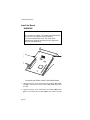
Locating a 16-Bit Slot
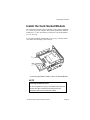
5. Find a free 16-bit slot on the motherboard and remove the metal
bracket.
Discharge Static Electricity
CAUTION
Static Electricity Warning
Always discharge electricity before handling the ISA
Bus Board, Card Socket Module(s) or when inserting
a PC Card into a socket. To discharge static
electricity, touch a grounded metal object. The
computer must be plugged in but not turned on (to
be grounded) before you touch its chassis to
discharge static electricity.
The Card Reader uses low-power components and is sensitive to static
discharge while you’re installing them in the computer. Just before
handling the components, touch a bare metal portion of your PC's
chassis. This discharges any potential static buildup that might damage
the board’s components.
PC-250, PC-260, and PC-300 User’s Guide
Page 21