1
Using the CardTalk Control Panel
NOTES
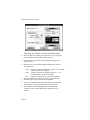
Bootable Partitions
This option is only available for the first partition on
a card.
Bootable FAT partitions are usually 0.5M in size and
must not be compressed. The custom partitions
option allows you to have an uncompressed
bootable partition and compressed partition(s) for
other files.
Card Reader cannot boot from an ATA or memory
card.
10. Repeat steps 4 through 6 for each partition.
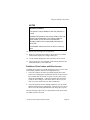
11. When your selections are complete, choose OK. The CardTalk
Control Panel displays the Configure dialog box.
12. To exit without changing the card’s partitions, choose Cancel.
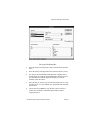
13. Choose Apply Now. The CardTalk Control Panel partitions and
formats the memory or hard disk card.
Partitions, Drive Letters and Drive Access
CardTalk can recognize up to eight partitions per socket. To use cards
with multiple partitions requires two configuration steps:
1. You must configure the socket for multiple logical drive letters.
This involves updating the CARDTALK.SYS device driver line in
the CONFIG.SYS file with the /N option. You may also need to
change the LASTDRIVE = setting in CONFIG.SYS. Reboot the
system for these changes to take effect. Refer to the Prepare the
Socket(s) section earlier in this for more information.
2. You must format the card for multiple partitions. You can format
multiple partitions before changing the /n option, but you won’t be
able to access the added partitions until you change the /n option.
The system assigns a drive letter to each partition based on the socket
into which you insert the card.
PC-250, PC-260, and PC-300 User’s Guide
Page 69