1
INSTALLATION OVERVIEW
1. During the rough-in phase, install speaker wire for the speakers and Cat5 cable for keypads, in each
zone.
2. Also during the rough-in phase, run a Cat5 wire from the location of the ELAN back to the Network
Assembly of the g! system for RS-232 communications. Refer to the RS-232 Connection Options
Integration Note for other options.
3. Mount the speakers and keypads in each zone, and install the ELAN and the sources.
4. Setup the ELAN to operate as desired using the VIA!Tools software. Refer to ELAN documentation
for details. (Not Required in version 5.0 and above)
5. Confirm proper audio and video switching as configured in step above.
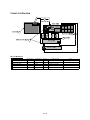
6. Connect the g! system to the ELAN system electrically. See the wiring diagrams for more information.
7. Configure the g! system for the ELAN and confirm communication between the ELAN and the
Controller.
8. Test the system by changing sources in a zone to confirm the correct source plays and volume is
controlled. Test source control for any sources that are to be controlled from the g! interface.
2 of 8