1
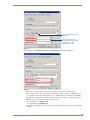
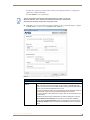
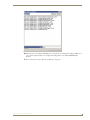
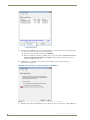
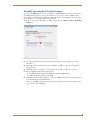
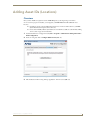
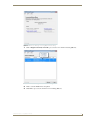
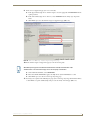
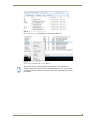
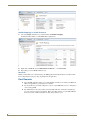
Upgrading RMS v3.x to RMS Enterprise Upgrading RMS v3.x to RMS Enterprise IF YOU INTEND TO INSTALL RMS ENTERPRISE ON A SERVER THAT IS CURRENTLY RUNNING RMS V3.x, READ AND FOLLOW THESE INSTRUCTIONS FIRST! Overview If you intend to install RMS Enterprise on a server that is currently running RMS v3.3, there are a few important steps to follow to ensure that RMS Enterprise will operate correctly, and to preserve the pre-existing RMS application. This provides a method of reverting back to the previously installed version of RMS, if necessary. Upgrading an existing installation of RMS to RMS Enterprise requires a base line of RMS v3.3, with a database version of 3.0.9 or greater. Older versions of RMS (v3.2 or lower) must be migrated to v3.3 prior to upgrading the system to RMS Enterprise as described in this section. Refer to RMS v3.x documentation for instructions. It is not necessary or recommended to un-install an existing version of RMS v3.3 in order to install RMS Enterprise on the same machine. These instructions describe stopping and then disabling RMS v3.3 services. If for any reason it is necessary to revert to the previous RMS v3.3 system, these services can be restarted. 1) Verify System Requirements for RMS Enterprise Since the minimum system requirements for RMS Enterprise are different than those for RMS v3.3, it is important to verify that the current system does in fact meet these newer requirements. Before proceeding with these instructions, verify that the current server meets the minimum system requirements for RMS Enterprise. Refer to the RMS Enterprise Installation Checklist section on page 5 for a detailed listing of Hardware System Requirements, supported Server Operating Systems, Additional Software Dependencies, and more. If your system meets these requirements, proceed with the instructions below. 2) Stop RMS v3.3 Services In the AMX Resource Manager Suite Service Manager (FIG. 15), stop all RMS Services (select each of the four services, and click the Stop button): FIG. 15 RMS Service Manager - Stop RMS Services This stops the RMS v3.3 services, until they are restarted manually, or the server is restarted. RMS Enterprise - Installation Guide 23