1
B4R Bass Amplifier
Connections:
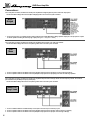
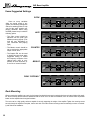
In the example shown below, the B4R’s two internal power amplifiers are bridged together to produce maximum output power.
Set the Stereo/Mono Bridge switch to the IN (Mono Bridged) position and connect the system as follows:
Mono
Bridged
1: Connect the heavy duty mono bridge speaker cable (provided) from the B4R’s Biamp/Mono Bridge Speaker Output jack to the input jack of a speaker cabinet capable of handling the extremely high output power. (pin 1+ = hot, pin 2+ = return)
In the example shown below, the B4R’s two internal power amplifiers will each power a set of full range cabinets.
Set the Stereo/Mono Bridge switch to the OUT (Stereo) position and connect the system as follows:
Dual
Mono
1: Connect a speaker cable from the B4R’s Power Amp A Speaker Output jack to the input jack(s) of a set of full range speakers.
2: Connect a speaker cable from the B4R’s Power Amp B Speaker Output jack to the input jack(s) of another set of full range speakers.
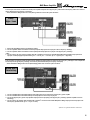
In the example shown below, the B4R’s two internal power amplifiers will power both a full range cabinet and a low frequency cabinet. The crossover
point is determined by the Biamp Frequency control (#16).
Set the Stereo/Mono Bridge switch to the OUT (Stereo) position and connect the system as follows:
Biamp: Full
Range / Lows
1: Connect a shielded cable from the B4R’s Biamp Low Out jack to its Power Amp A Power Amp In jack.
2: Connect a speaker cable from the B4R’s Power Amp A Speaker Output jack to the input jack of the low frequency cabinet(s).
3: Connect a speaker cable from the B4R’s Power Amp B Speaker Output jack to the input jack of the full range cabinet(s).
8